


Overview

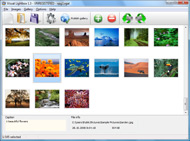
It's no secret that adding photos to your blog posts is one of the most effective ways to enhance your blog and attract attention to your writing. Flickr has millions of photos available in its database. A simple FREE tool called Flickr Gallery allows you to create a custom image gallery with a cool slide show of the most recent and most interesting photos from Flickr on your website or blog in a few easy steps. Just visit Flickr website and find photostream, photoset or a single photo you like. Enter the address of flickr page to add all photos from this page in your gallery, select the style of thumbnails and the overlay window and add the HTML embed code on your website or blog.
A few clicks and you'll see a stylish photo gallery with beautifull lightbox and zoom effects on your own website or blog!


Flickr Gallery for Windows   Flickr Gallery for MAC

Want more?

Example

Lightbox gallery sample

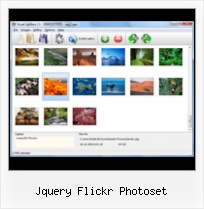
The following image set is generated by Flickr Gallery tool. Click any picture to run Lightbox gallery.

The photo gallery above is an in-page usage demo of Lightbox with images from Flickr. The web gallery created with Flickr Gallery wizard is placed inside the html page. You can also check the full-page demo web gallery. This example takes whole browser area to show the website gallery.Select Random Thumbnails Embed Flickr Photo

How to Use

Step 1. Adding flickr images to your own gallery.


Locate the photo, photoset or photostream you want to use in your Flickr slideshow. Click on it to see the photo on its own page.

Copy URL of the flickr page.

Select Add images from Flickr... from the 'Add' button on the Toolbar.

Add images from Flickr

In the appeared window paste URL of the flickr page. Specify also the number of photos you want to add from the flickr page. Flickr Gallery will now include these photos in your project.

Add images from Flickr

If you have included the photos that you do not wish to be in your web gallery, you can easily remove them. Select all images that you wish to remove from photo gallery, and select Delete images. from the Images menu. You can pick and choose pictures by holding the CTRL while clicking the pictures you like.

Step 2. Adding caption.

The name of the photo on flickr page will automatically appear in the caption. When you select a photo you'll see the various info about it, such as: Path, Size, date of last change and Caption. You can add any comment or text about the photo (up to 512 symbols).

Step 3. Gallery properties.

Change the name of your flickr album, the size and quality of your pictures with Flickr Gallery. From the Gallery menu, select Properties or use "Edit Gallery Properties" button on the toolbar.

On the first tab of the Gallery Properties window you can change the name of your photo album and enable/disable the following properties: Slide Show, Auto play Slide Show, Zoom effect, Overlay Shadow. You can also set the Overlay shadow color and select the Engine you want to use (jQuery or Prototype + script.aculo.us).

On the second tab of the Gallery Properties window you can select the thumbnail you want to use, set the Thumbnails Resolution, Thumbnails Quality, Thumbnails Titles. Select Thumbnails Format (save in PNG or JPG format). Specify the Number of columns in you photo album and the Page color.

On the third tab of the Gallery Properties window you can select the template, Image resolution and Image quality of your pictures and change the Watermark.

You can set up the various sizes for exported images.

Control the quality of output PNG or JPEG format image by defining output "Image quality" and "Thumbnail quality" parameters (0%…100%).

Step 4. Save your photo gallery as project file.

When you exit Flickr Gallery application, you'll be asked if you want to save your project. The project consists of the pictures you choose to put on your web photo gallery and all your settings. It's a good idea to save the project, because that will allow you to change the project in case you decide to do something different with future galleries. So click Yes, then enter a name for your project. To select the location of your project, just click the Browse folders button and choose a different location. Then click Save.

Code Flickr Embedded Gallery Jquery Flickr Photoset

Download Flickr Gallery


Download Flickr Gallery Download Free Edition
for Windows
Download Flickr Gallery Download Free Edition
for MAC

Flickr Gallery is free for non-commercial use.

A small fee is required for business use. Flickr Gallery Business Edition additionally provides an option to remove the Flickr Gallery. Com credit bar as well as a feature to put your own logo to images. After you complete the payment via the secure form, you will receive a license key instantly by email that turns the Flickr Gallery Free Edition into a Business one. You can select the most suitable payment mode: bank transfer, PayPal, check, credit card etc. Also you can get Business Edition for free if you help with translating Flickr Gallery into your native language, please contact us at for more info.

Jquery Flickr Widget

Buy Flickr GalleryBuy Business Edition
for Windows

$49
Single Website
$69
Unlimited Websites
Buy Flickr GalleryBuy Business Edition
for MAC

$49
Single Website
$69
Unlimited Websites

Support

For general help, troubleshooting and feature requests contact Customer Support at . Make sure to include details on your operating system, browser, Flickr Gallery version and a link (or relevant code).Flickr Embedded Slideshow Settings

Feedback

    * I have just bought this product and think it is great. As it is extremely easy to use it is something I could get my clients to purchase to upload their own portfolio and latest projects etc.

    * First of all, I love you Flickr Gallery. I think it's beautiful! I purchased the lightbox “business edition” yesterday, and I’m very happy how easy it is to use. Found this to be one of the fastest ways to get a gallery on the web. Thanks.

    * This looks like EXACTLY what I need for my site. It would make my job much faster! Love your program. Thank you!!Ruby Rails Random Flickr Picture

    * I would like to say that Flickr Gallery is a stunning lil program! Its almost too good to be true i'd say! I've been looking for tutorials to create a lightbox gallery, but just couldnt come right. Im so glad i found Flickr Gallery!

FAQ

Q:I purchased your business license today but I don't see any way to update so the watermark is either missing or replace with mine.What do I do?

A:Free edition of Flickr Gallery doesn't allow you to remove our watermark.

Register your Flickr Gallery application at first. Use reg. key from the license message you received after the purchase. After the registration you can remove watermarks.

Open Gallery->Properties->Templates: Watermark. Click to disable this option or use your own watermark.


RELATED

ModX Snippet for a simple jQuery Flickr fade-in/out slideshow Upload the Flickr API library to your server and call it something like "flickr_api.inc. An explination of the jQuery can be found in a previous post;

rpheath's jquery-flickr at master - GitHub Implements (some of) the Flickr API using jQuery. jquery.flickr.js. Tue Feb 24 20:30:38 -0800 2009. added support for getting photos from a photoset [rpheath] README.textile (Some of) the Flickr API in jQuery. Sometimes all you need is a simple javascript interface to pull in Flickr photos

jquery-flickr - Google Code jQuery Flickr plug-in is a JavaScript interface for Flickr Services API written on top of the jQuery library. It's function is to easy to implement: $("#myElement").flickr(); supports custom callbacks, and custom requests. returns recent photos & photosets by id. returns sorted search results by user

10 Wonderful Collection Of jQuery Slideshow Tutorials Looking great means, your site will be visited more. Java-scripts a precise means aimed at making your website look great. And to achieve that, jQuery is all to aid the concepts of jQuery, is the Flickrgallery, it even allows one to easily pullout the photos from the Flickr photoset directly

krl_flickr_photoset script details from Kelvin Luck krl_flickr_photoset script - krl_flickr_photoset krl_flickr_photoset displays a list of my photosets from flickr.com on your photos page. It connects to flickr.com through the Flickr API and calls flickr.photosets.getList to get a list of photo sets for a given user and then outputs the primary photo

jQuery Flickr Image Gallery - How can i choose a specific set jQuery Support Portal The Gallery streams directly the photos from Flickr. You can choose the sets. What I want now is to show the user only one kind of set per page. So he should not be able to choose different photosets. Does anyone from you guys know what i have to change in the code?

Pulling Your Flickr Feed with jQuery | Viget Inspire Sure, you could easily make a Flickr badge to display your photos, but this method gives you more control over how it display your data, especially when using a framework like jQuery. There are many other ways to display the api.flickr.com/services/rest/?method=flickr.photosets.getPhotos

Flickr Album - Joomla! Extensions Directory Embed a flickr album within an article. These albums can be sourced from a particular flickr photoset, user, group or search string. Photos are displayed according to a user defined grid. This plugin uses 3 javascript libraries to create Flickr

boncey.org - list blogs 1 blog for tag jquery. Automatically adding photos to Flickr photosets. I'm quite lazy when it comes to organising my photos into photosets on Flickr. The whole process has always been a bit too manual for my liking. metadata to a photoset description on Flickr then parse and match

Flickr Gallery - SliderShowcase.com flickrGallery is an open-source jQuery slideshow plugin that allows you to create a photo gallery that will dynamically pull images from a photoset in Flickr

jquery.flickrGallery.js jquery. flickrGallery.js. flickrGallery is a jQuery plugin for embedding flickr photos into a webpage. Plugin considers a Gallery to be a list of Albums (similar to Flickr's Collections) Given a flickr photoset id, this method returns true or false indicating whether its photo information has

Tutorial: Use the Flickr API, Javascript (jQuery), AJAX and A tutorial on how to build a detailed Flickr photo wall with JavaScript, jQuery, JSON and Ajax

krl_flickr_photoset released | kelvinluck.com I have just released the code which powers the list of my Flickr photosets on my photos page A little while ago I added some code to display my Flickr photosets on my photos page

Free jQuery Flickr Joomla Module Free | Joomla Extension a free Joomla 1.5 flickr image gallery module - Free extension The module is based on the script by Project Atomic and uses JQuery to do all of the hard lifting

jquery.flickr-min.js {case'photoset':url+='&method=flickr.photosets.getPhotos&photoset_id if(s.sort)url+='&sort='+s.sort;break;default:url+='&method=flickr.photos.getRecent';} if(s.per_page)url+='&per_page='+s.per_page;if(s.page)url+='&page='+s.page;if(s.size=='o')url+='&extras=original_format';return url;}};})(jQuery)

Plugins | jQuery Plugins The Fancy Photoset plugin utilizes the power of jQuery and Fancybox to dynamically create photo galleries from your Flickr Photosets. You will also need a Flickr account and a Flickr API Key to use this plugin. Usage. The fancyPhotoset method is called on a jQuery selector and takes an options hash as

Listing your photo albums with the Flickr API and jQuery JQuery makes building up a complex HTML structure fairly simple and browser-agnostic. What isn't so good? Well, the photosets JSON doesn't change very often, but it is downloaded from Flickr with every page view. My list of sets is 7 KB of JSON, but could easily be much more

Paul Thompson's Joomla Code I've also added an option to disable the inclusion of the jQuery Flickr library, in case you happen to include that already as well. from a particular flickr photoset, user, group or search string

Open Source Flickr Photo Gallery Using jQuery - Web Development flickrGallery is an open-source photo gallery for jQuery that allows you to dynamically pull images from a photoset in Flickr. The main functionaliti

Embed Flickr Albums : Flickr Gallery Build superior photoalbums for your Website with Flickr Gallery! Just visit Flickr website and find photostream, photoset or a single photo you like

Create a Drupal Photo Gallery Using Flickr, CCK & Views Drupal-focused web development blog. Featuring tips, tricks and solutions to help you build websites with Drupal. The flickr module is great right out of the box. It exposes some handy blocks for displaying recent photos and photosets as well

Download Flickr Gallery at All Freeware (Gallery & Cataloging Flickr Gallery 3.1 free download, review. A simple FREE tool called Flickr Gallery allows you to embed a custom image gallery, or a cool slideshow with beautiful lightbox and zoom effects of the most interesting photos from Flickr.com on your

Bring Flickr to Your Website Using JSON and jQuery | The Flickr is a great website for hosting and sharing your photos. If you are an amateur photographer who likes to share photos from your latest outdoor adventure,

10 Extremely Useful jQuery Media Plugins | Templates.com Replace links to media content with the actually embedded media with the help of this jQuery plugin.The media must be supported by http://www.oembed.com. This includes YouTube, Vimeo and Flickr among others. 4. jquery.mb.YTPlayer Photoset. This is a jQuery plugin for viewing Flickr Photostreams

Flickr + jQuery + Force.com = Awesome^5 [Part 1] " The Silver A developer's view of Cloud Computing platforms & technologies. Flickr + jQuery + Force.com = Awesome^5 [Part 1] with one comment Well our aim is to build a gallery viewer using images sourced from Flickr

Mastering the Flickr API with PHP and cURL " Dark Crimson Blog The Flickr API is a very powerful and easy to use way to put photos on your website without having to worry This tutorial will cover how to make an API call for a photoset and then format and display a list of ~100px thumbnail images in

15 Great jQuery Images Gallery Plugins To Showcase Your Work Fancy Thumbnail Hover Effect With jQuery. jQuery Flickr Gallery. This jQuery Flickr Gallery allow multiple set of images from Flickr. Inside each photoset you can navigate through the photos and once you are done, you can return by to all the folders that show all the photoset

