



Overview

It's no secret that adding photos to your blog posts is one of the most effective ways to enhance your blog and attract attention to your writing. Flickr has millions of photos available in its database. A simple FREE tool called Flickr Gallery allows you to create a custom image gallery with a cool slide show of the most recent and most interesting photos from Flickr on your website or blog in a few easy steps. Just visit Flickr website and find photostream, photoset or a single photo you like. Enter the address of flickr page to add all photos from this page in your gallery, select the style of thumbnails and the overlay window and add the HTML embed code on your website or blog.
A few clicks and you'll see a stylish photo gallery with beautifull lightbox and zoom effects on your own website or blog!


Flickr Gallery for Windows   Flickr Gallery for MAC

Want more?

Example

Lightbox gallery sample

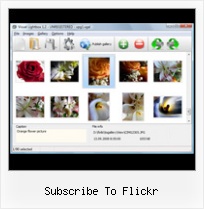
The following image set is generated by Flickr Gallery tool. Click any picture to run Lightbox gallery.

The photo gallery above is an in-page usage demo of Lightbox gallery that uses images from Flickr. The gallery created with Flickr Gallery software is placed inside the website page. You can also check the full-page demo gallery. This example takes whole browser area to show the website gallery.Jquery Flickr Lightbox Widget Flash

How to Use

Step 1. Adding flickr images to your own gallery.


Locate the photo, photoset or photostream you want to use in your Flickr slideshow. Click on it to see the photo on its own page.

Copy URL of the flickr page.

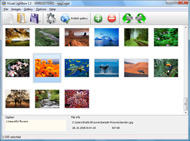
Select Add images from Flickr... from the 'Add' button on the Toolbar.

Add images from Flickr

In the appeared window paste URL of the flickr page. Specify also the number of photos you want to add from the flickr page. Flickr Gallery will now include these photos in your project.

Add images from Flickr

If you have included the photos that you do not wish to be in your web gallery, you can easily remove them. Select all images that you wish to remove from photo gallery, and select Delete images. from the Images menu. You can pick and choose pictures by holding the CTRL while clicking the pictures you like.

Step 2. Adding caption.

The name of the photo on flickr page will automatically appear in the caption. When you select a photo you'll see the various info about it, such as: Path, Size, date of last change and Caption. You can add any comment or text about the photo (up to 512 symbols).

Step 3. Gallery properties.

Change the name of your flickr album, the size and quality of your pictures with Flickr Gallery. From the Gallery menu, select Properties or use "Edit Gallery Properties" button on the toolbar.

On the first tab of the Gallery Properties window you can change the name of your photo album and enable/disable the following properties: Slide Show, Auto play Slide Show, Zoom effect, Overlay Shadow. You can also set the Overlay shadow color and select the Engine you want to use (jQuery or Prototype + script.aculo.us).

On the second tab of the Gallery Properties window you can select the thumbnail you want to use, set the Thumbnails Resolution, Thumbnails Quality, Thumbnails Titles. Select Thumbnails Format (save in PNG or JPG format). Specify the Number of columns in you photo album and the Page color.

On the third tab of the Gallery Properties window you can select the template, Image resolution and Image quality of your pictures and change the Watermark.

You can set up the various sizes for exported images.

Control the quality of output PNG or JPEG format image by defining output "Image quality" and "Thumbnail quality" parameters (0%…100%).

Step 4. Save your photo gallery as project file.

When you exit Flickr Gallery application, you'll be asked if you want to save your project. The project consists of the pictures you choose to put on your web photo gallery and all your settings. It's a good idea to save the project, because that will allow you to change the project in case you decide to do something different with future galleries. So click Yes, then enter a name for your project. To select the location of your project, just click the Browse folders button and choose a different location. Then click Save.

Auto Post Flickr To Twitter Subscribe To Flickr

Download Flickr Gallery


Download Flickr Gallery Download Free Edition
for Windows
Download Flickr Gallery Download Free Edition
for MAC

Flickr Gallery is free for non - commercial use.

A small fee is required for business use. Flickr Gallery Business Edition additionally provides an option to remove the Flickr Gallery. Com credit line as well as a feature to put your own logo to images. After you conclude the payment via the secure form, you will receive a license key instantly by email that turns the Flickr Gallery Free Edition into a Business one. You can select the most appropriate payment mode: PayPal, credit card, bank transfer, check etc. Also you can get Business Edition for free if you help with translating Flickr Gallery into your native language, please contact us at for more info.

Simpleflickr How To Use

Buy Flickr GalleryBuy Business Edition
for Windows

$49
Single Website
$69
Unlimited Websites
Buy Flickr GalleryBuy Business Edition
for MAC

$49
Single Website
$69
Unlimited Websites

Support

For general help, troubleshooting and feature requests contact Customer Support at . Make sure to include details on your operating system, browser, a link (or relevant code) and Flickr Gallery version.Wordpress 2 9 2 Flickr Manager

Feedback

    * I'm absolutely loving Flickr Gallery Business and Video LightBox. Amazing, quick and painless, to create a custom, browser independent gallery. And it works first time - every time! Best value for money I've seen in quite a while...

    * I have just bought this product and think it is great. As it is extremely easy to use it is something I could get my clients to purchase to upload their own portfolio and latest projects etc.

    * I just tried the application, It is wonderful idea. Like you said in the website "few clicks without writing a single line of code" because most of the people is not web designers".Ftp For Flickr Pro Accounts

    * This looks like EXACTLY what I need for my site. It would make my job much faster! Love your program. Thank you!!

FAQ

Q:Instead of making one page with 40 photos, is there no property to make 2 or more pages?

A:You can do it in the following way:

1. Create your gallery in Flickr Gallery and publish it on a local drive in any test folder.
2. Make two copies of the generated index.html file (for example index1.html and index2.html).
3. Open index.html, index1.html and index2.html files in any text editor.
4. Find code for the gallery inside the BODY tag and cut some part of the images, so you'll have different images on each page.

<!-- Start Flickr Gallery.com BODY section -->
<div class="gallery">
<!-- leave the following code on index.html page -->
<a href="./data/images/1.jpg" rel="lightbox[sample]" title="Best Toy Ever"><img src="./data/thumbnails/1.png" /></a>
<a href="./data/images/8.jpg" rel="lightbox[sample]" title="PrueaMacro"><img src="./data/thumbnails/8.png" /></a>

<!-- leave the following code on index1.html page -->
<a href="./data/images/3.jpg" rel="lightbox[sample]" title="Macro Leaf."><img src="./data/thumbnails/3.png" /></a>
<a href="./data/images/11.jpg" rel="lightbox[sample]" title="Bell Pepper"><img src="./data/thumbnails/11.png" /></a>

<!-- leave the following code on index2.html page -->
<a href="./data/images/5_0.jpg" rel="lightbox[sample]" title="5"><img src="./data/thumbnails/5_0.png" /></a>
<a href="./data/images/6_0.jpg" rel="lightbox[sample]" title="6"><img src="./data/thumbnails/6_0.png" /></a>

<!--[if lte IE 6]><script src="engine/js/pngfix_vlb.js" type="text/javascript"></script><![endif]-->
<a id="vlightbox" href="http://Flickr Gallery.com/">Online Photo Album Sharing by Flickr Gallery.com</a>
</div>
<!-- End Flickr Gallery.com BODY section -->

5. Create links to switch between your pages, for example:
<a href="index.html">1</a>  <a href="index1.html">2</a>  <a href="index2.html">3</a> 


Q:I want to change color of the overlay shadow? How can I do this?

A:Open engine\css\Flickr Gallery.css and find the following code:

#overlay{
position: absolute;
top: 0;
left: 0;
z-index: 90;
width: 100%;
height: 500px;
background-color: #FFF;
filter:alpha(opacity=60);
-moz-opacity: 0.6;
opacity: 0.6;
}

set the background-color parameter :

#overlay{
position: absolute;
top: 0;
left: 0;
z-index: 90;
width: 100%;
height: 500px;
background-color: #FF00FF;
filter:alpha(opacity=60);
-moz-opacity: 0.6;
opacity: 0.6;
}


RELATED

Flickr Blog Welcome the Keene Public Library to the Commons! Welcome the Reykjavík Museum of World Cup: Science Edition. World Cup memories from the Commons! Flickr + Facebook! Street

Flickr | Orangescale Studio I just realized that it's almost a year since we subscribed to Flickr Pro account. Anyway, when we upgraded our Flickr account to the pro version, we got an offer to get some printed cards from MOO. Two weeks ago (June 19th, 2008), Lala use this offer

Flickr: Chris Pirillo's Photostream Flickr is almost certainly the best online photo management and sharing application in the world. Show off your favorite photos and videos to the world, securely and privately show content to your friends and family, or blog the photos and videos

Searching for flickr - Yahoo! Widgets 1,000s of free Widgets help you save time by bringing your favorite content and services right to you Subscribe. Share. Flickr Widget. by Yahoo!. A complement to Yahoo!'s popular Flickr photo sharing service, the new Flickr Widget allows you to display, upload, tag, and organize photos on

I, Reporter: Watch Flickr for Citizen Journalism in Action Where should you look to find current citizen journalism? TIP: An easy way to follow new additions to that Flickr page is to subscribe to Flickr's feed for the "Katrina" tag

Contact/Subscribe " Flickr Best Photos Selection Some awesome photos from Flickr. Remember to explore Archives! Contact/Subscribe. If you have anything to say, comment, suggest, discuss or something to tell me you can leave a comment in the suitable post, or you can contact me by writing to:

Flickr | Facebook Welcome to the official Facebook Page of Flickr. Get exclusive content and interact with Flickr right from Facebook. Join Facebook to create your own Page or to start connecting with friends

What Is Flickr (and Hot Tips for Using It) - O'Reilly Media Flickr is an online photo management and sharing application. And it's also one of the most innovative photo services available today. In this article, Giles Turnbull shows you how Flickr works, then introduces you to some of the great tools you

GeekTonic: The Ultimate Flickr Tools Hacks and Scripts Database If you enjoyed this post, please subscribe to this blog HERE. Technorati Tags: flickr, picture, photo, hack. 9/19/2007 01:16:00 AM | Labels: flickr, hack, How To, media center, photos, Recommended Links | This entry was posted on 9/19/2007 01:

Subscribe to non-.Mac photocasts in iPhoto - Mac OS X Hints To subscribe, use iPhoto -> File -> Subscribe to Photocast, and enter the feed URL there. Subscribe to original images in Flickr feeds. Authored by: 3eyes on

Flickr Photos - eHow.com Flickr is a free photo and video website than belongs to Yahoo! The Flickr free edition lets you upload as many as 100 megabytes of photos per month. If you need unlimited storage, you can subscribe to Flickr Pro for $24.95 annually (March 2010)

Subscribe to a Flickr page with Notifyr Web site Notifyr lets you subscribe to anyone's Flickr page so that you receive an email notification every time new images are added

Subscribe Subscribe to GOVERNING magazine -- a limited number of subscriptions free to certain qualified state and local government officials

Mac Tips Daily! #173 - iPhoto PhotoCasts and Flickr It's basically the same as a podcast, except you subscribe to pictures. Here is how to subscribe to Flickr photo sets and have the pictures download right into iPhoto 6. Open 'Safari' and go to Flickr.com Next, you can look for a particular photo set, or browse for something interesting

Turn your iPhone into a mobile Flickr photo frame In case you haven't heard about it, it's an OPML / RSS program that allows you to subscribe to Flickr feeds so you can view slideshows of pictures on your Mac. Dave originally wrote it to further bridge the web with high-def we might see a way to subscribe to photo streams without the Mac

June 8-14, 2010 - Flickr Pic of the Week - June 2010 - East This Flickr Pic is a haunting blend of discarded cars and natural scenery. Subscribe to Flickr Pic of the Week : Diablo Flickr Pic of the Week. June 8-14, 2010. This Flickr Pic is a haunting blend of discarded cars and natural scenery

Tools for embedding Flickr Slideshows I came across few nice tools to embed Flickr Photos in your blogs or myspace pages, I will make a list of them here and update the post with new tools whenever

Flickrtoys - the ultimate flickr-toys and tools collection Taken from the flickr-blog! In the last week we deployed new code to Flickr 50 times, including 546 changes want to check out Richard's meaty blog post "Flickr Uploadr, start to

Subscribe To R. Richard Hobbs Flickr Photos Subscribe immediately to R. Richard Hobbs Flickr Photos by clicking on your favorite RSS Reader. Subscribe using your browser: You can subscribe to R. Richard Hobbs Flickr Photos using

Fake Flickr Demonstration Therefore, getting a Pro Account means that you need to subscribe to Flickr for a year. Websites are free to use whatever buttons they choose, or even simple links that allow the user to micro-subscribe

Flickr-APIs Info Page You can subscribe to the list, or change your existing subscription, in the sections below. Subscribing to Flickr-APIs. Subscribe to Flickr-APIs by filling out the following form. You will be sent email requesting confirmation, to prevent others from gratuitously subscribing you

Subscribe To Flickr : Flickr Gallery Subscribe To Flickr. Improve your online photo gallery with Flickr Gallery!. Greybox Swf It's no secret that adding photos to your blog posts is one of the most effective ways to enhance your blog and attract attention to your writing. Flickr has millions of photos available in its database

Flickr Tools Flickr is free to use and upload 20mb of photos per month, but once you get hooked, and Flickr has one of the more refined interfaces of all the web 2.0 apps, including online

Jim Heid's Mac iLife 09 Site: iTunes, iPod, iPhoto, iMovie iPhoto 6 Tip: Subscribe to Flickr RSS Feeds in iPhoto. As many of you know, I'm what might Subscribe to a feed, and iPhoto 6 updates it for you whenever you like_ every hour, every

Exploring Flickr - Find your photos in Flickr's explore section Once you subscribe, you will receive a comment for your photos that make it to explore. The comment will look like the following, In order to subscribe, please authenticate yourself through Flickr

