



Overview

It's no secret that adding photos to your blog posts is one of the most effective ways to enhance your blog and attract attention to your writing. Flickr has millions of photos available in its database. A simple FREE tool called Flickr Gallery allows you to create a custom image gallery with a cool slide show of the most recent and most interesting photos from Flickr on your website or blog in a few easy steps. Just visit Flickr website and find photostream, photoset or a single photo you like. Enter the address of flickr page to add all photos from this page in your gallery, select the style of thumbnails and the overlay window and add the HTML embed code on your website or blog.
A few clicks and you'll see a stylish photo gallery with beautifull lightbox and zoom effects on your own website or blog!


Flickr Gallery for Windows   Flickr Gallery for MAC

Want more?

Example

Lightbox gallery sample

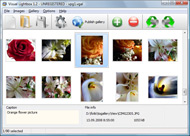
The following image set is generated by Flickr Gallery tool. Click any picture to run Lightbox gallery.

The example above is an in-page usage demo of Lightbox gallery that uses images from Flickr. The website gallery created with Flickr Gallery application is placed inside the html page. You can also check the full-page demo gallery. This example takes whole browser area to show the web gallery.Backup Flickr Open Source

How to Use

Step 1. Adding flickr images to your own gallery.


Locate the photo, photoset or photostream you want to use in your Flickr slideshow. Click on it to see the photo on its own page.

Copy URL of the flickr page.

Select Add images from Flickr... from the 'Add' button on the Toolbar.

Add images from Flickr

In the appeared window paste URL of the flickr page. Specify also the number of photos you want to add from the flickr page. Flickr Gallery will now include these photos in your project.

Add images from Flickr

If you have included the photos that you do not wish to be in your web gallery, you can easily remove them. Select all images that you wish to remove from photo gallery, and select Delete images. from the Images menu. You can pick and choose pictures by holding the CTRL while clicking the pictures you like.

Step 2. Adding caption.

The name of the photo on flickr page will automatically appear in the caption. When you select a photo you'll see the various info about it, such as: Path, Size, date of last change and Caption. You can add any comment or text about the photo (up to 512 symbols).

Step 3. Gallery properties.

Change the name of your flickr album, the size and quality of your pictures with Flickr Gallery. From the Gallery menu, select Properties or use "Edit Gallery Properties" button on the toolbar.

On the first tab of the Gallery Properties window you can change the name of your photo album and enable/disable the following properties: Slide Show, Auto play Slide Show, Zoom effect, Overlay Shadow. You can also set the Overlay shadow color and select the Engine you want to use (jQuery or Prototype + script.aculo.us).

On the second tab of the Gallery Properties window you can select the thumbnail you want to use, set the Thumbnails Resolution, Thumbnails Quality, Thumbnails Titles. Select Thumbnails Format (save in PNG or JPG format). Specify the Number of columns in you photo album and the Page color.

On the third tab of the Gallery Properties window you can select the template, Image resolution and Image quality of your pictures and change the Watermark.

You can set up the various sizes for exported images.

Control the quality of output PNG or JPEG format image by defining output "Image quality" and "Thumbnail quality" parameters (0%…100%).

Step 4. Save your photo gallery as project file.

When you exit Flickr Gallery application, you'll be asked if you want to save your project. The project consists of the pictures you choose to put on your web photo gallery and all your settings. It's a good idea to save the project, because that will allow you to change the project in case you decide to do something different with future galleries. So click Yes, then enter a name for your project. To select the location of your project, just click the Browse folders button and choose a different location. Then click Save.

Large Image Flickr Badge How To Copy Photos From Flickr

Download Flickr Gallery


Download Flickr Gallery Download Free Edition
for Windows
Download Flickr Gallery Download Free Edition
for MAC

Flickr Gallery is free for non-commercial use.

A small fee is required for business use. Flickr Gallery Business Edition additionally provides an option to remove the Flickr Gallery. Com credit string as well as a feature to put your own logo to images. After you finish the payment via the secure form, you will receive a license key instantly by e-mail that turns the Flickr Gallery Free Edition into a Business one. You can select the most appropriate payment method: PayPal, check, bank transfer, credit card etc. Also you can get Business Edition for free if you help with translating Flickr Gallery into your native language, please contact us at for more info.

Flickr Static Link For Set

Buy Flickr GalleryBuy Business Edition
for Windows

$49
Single Website
$69
Unlimited Websites
Buy Flickr GalleryBuy Business Edition
for MAC

$49
Single Website
$69
Unlimited Websites

Support

For troubleshooting, feature requests and general help contact Customer Support at . Make sure to include details on your Flickr Gallery version, operating system, a link (or relevant code) and a browser.Www Flickrs Log In Com

Feedback

    * I downloaded your trial version to see if I could get it to work with my website, and I am almost there (I have been looking for something like this for ages)..

    * I tried Flickr Gallery and for me its a very cool and usefull application. Its so easy to manage my galleries and it looks very nice.

    * I'm absolutely loving Flickr Gallery Business and Video LightBox. Amazing, quick and painless, to create a custom, browser independent gallery. And it works first time - every time! Best value for money I've seen in quite a while...Flickr Showreel Embed

    * I have installed Flickr Gallery to trial. All good, loving it!! I want to get an business version of your great programm. I love it - soo easy to use!!

FAQ

Q:Instead of making one page with 40 photos, is there no property to make 2 or more pages?

A:You can do it in the following way:

1. Create your gallery in Flickr Gallery and publish it on a local drive in any test folder.
2. Make two copies of the generated index.html file (for example index1.html and index2.html).
3. Open index.html, index1.html and index2.html files in any text editor.
4. Find code for the gallery inside the BODY tag and cut some part of the images, so you'll have different images on each page.

<!-- Start Flickr Gallery.com BODY section -->
<div class="gallery">
<!-- leave the following code on index.html page -->
<a href="./data/images/1.jpg" rel="lightbox[sample]" title="Best Toy Ever"><img src="./data/thumbnails/1.png" /></a>
<a href="./data/images/8.jpg" rel="lightbox[sample]" title="PrueaMacro"><img src="./data/thumbnails/8.png" /></a>

<!-- leave the following code on index1.html page -->
<a href="./data/images/3.jpg" rel="lightbox[sample]" title="Macro Leaf."><img src="./data/thumbnails/3.png" /></a>
<a href="./data/images/11.jpg" rel="lightbox[sample]" title="Bell Pepper"><img src="./data/thumbnails/11.png" /></a>

<!-- leave the following code on index2.html page -->
<a href="./data/images/5_0.jpg" rel="lightbox[sample]" title="5"><img src="./data/thumbnails/5_0.png" /></a>
<a href="./data/images/6_0.jpg" rel="lightbox[sample]" title="6"><img src="./data/thumbnails/6_0.png" /></a>

<!--[if lte IE 6]><script src="engine/js/pngfix_vlb.js" type="text/javascript"></script><![endif]-->
<a id="vlightbox" href="http://Flickr Gallery.com/">Online Photo Album Sharing by Flickr Gallery.com</a>
</div>
<!-- End Flickr Gallery.com BODY section -->

5. Create links to switch between your pages, for example:
<a href="index.html">1</a>  <a href="index1.html">2</a>  <a href="index2.html">3</a> 


Q:I want to change color of the overlay shadow? How can I do this?

A:Open engine\css\Flickr Gallery.css and find the following code:

#overlay{
position: absolute;
top: 0;
left: 0;
z-index: 90;
width: 100%;
height: 500px;
background-color: #FFF;
filter:alpha(opacity=60);
-moz-opacity: 0.6;
opacity: 0.6;
}

set the background-color parameter :

#overlay{
position: absolute;
top: 0;
left: 0;
z-index: 90;
width: 100%;
height: 500px;
background-color: #FF00FF;
filter:alpha(opacity=60);
-moz-opacity: 0.6;
opacity: 0.6;
}


RELATED

How to Add Flickr Images to your Web Site To find a "set_id" number, open your browser and go to the Flickr page for that set. You'll find the relevant numbers as the last part of the URL in the location bar. Copy them. For example, let's say we had a set of photos from the Ben Franklin Bridge we wanted to display

How To Add Flickr Images to Microsoft Word Documents This post introduces an interesting tool called Flickr4Word using which you can easily insert and embed images from Flickr into Microsoft Word documents. [How-To] Add Flickr Photos to your Word Documents with Ease What do you do when you have to embed an image from Flickr into your Word Documents?

How to Use Flickr: Basics and Beyond Flickr is one of the most popular photo-sharing sites on the Internet. Owned by Yahoo!, Flickr offers its users a website where they can create free accounts that let them store, share, and explore digital photos. Flickr is also an online

Save locked Orkut album and profile photos Few months back I experienced the same problem while copying photos from Flickr.com . Although there was no problem with right click, the saved image was corrupted. Actually this trick to save the copy protected images is a Mozilla Firefox hack

How to Grab Photos From Flickr And Set As Ubuntu Wallpaper You Are Here: Home " Linux " How to Grab Photos From Flickr And Set As Ubuntu Wallpaper How to Grab Photos From Flickr And Set As Ubuntu Wallpaper (Automatically)

Move Photos Between Flickr, Photobucket, Picasa with Migratr With Migratr, you can effortlessly move your photographs between services, complete with metadata and album hierarchy - all automatically

How to identify public domain photos on Flickr :: Free Tech Free Tech Support on How to identify public domain photos on Flickr from Dave Taylor

Move or Copy Your Online Photos Easily with Migratr (Flickr Move or Copy Your Online Photos Easily with Migratr (Flickr, Picasa, etc.) - Taking You on a Guided Tour of the Web at Digital Alchemy It automates the task of downloading hundreds or thousands of photos from, say, Flickr and re-uploading them to an account at another photo site

Sync and Share Flickr Photos and Albums in Facebook Automatically Flickrtab is a Facebook application which syncs Flickr photos in Facebook. You can cross post updates in Flickr and all the photo uploads are shown in your Facebook profile and friends news feeds

How To Copy or Save Photos from Locked Albums in Orkut | PCs Recently Orkut added a feature which prevents any one from copying or saving your pictures from your albums in Orkut Profile. This is an automatic feature which How To Copy or Save Photos from Locked Albums in Orkut. Posted by Prasanth Chandra on 9/29/08 • Categorized as Orkut. Hello there!

How to Make Videos for Flickr From Your Photos How to Make Videos for Flickr From Your Photos. Flickr Pro members can now upload videos along with photos. It's a no-brainer that Windows Live Gallery and Flickr Uploader will get upgraded soon so you can push both videos and still photos from the camera to your online Flickr account in one shot

Photo of the year 2009 / Runner-up #01 on Flickr - Photo Sharing! This photo of the KABOOM firework "lost" to the wider view, including the moon. Mostly because I worked hard to get Do not copy or otherwise reuse my photos. See flickr TOS on how to link back to a photo. Contact me if you want a print or e-copy. This photo has notes. Move your mouse

YouTube - Showzey - How to Copy Photos from Gmail How to Copy Photos from Gmail?Showzey will collect all your photos and photos of your friends from your Gmail , Facebook, MySpace, Picasa and Flickr

Migrate pictures from Flickr to Picasa Looking for a way to migrate or copy your pictures between online photo sharing services like Picasa Web Albums, Flickr or Zooomr? Right now I have all of my digital pictures stored at Picasa, but I also have a few albums stored in Flickr since I

Quickly Browse Flickr Photos / Images, Without Having to I must confess that I have fall in love with Flickr, the photo sharing site many people adores. A Flickr photo page can be huge and the developers have opt to divide it into small pages that you can browse by clicking the "Next" or page number

How To Copy Photos From Flickr : Flickr Gallery How To Copy Photos From Flickr. Create web photo gallery for your Website with Flickr Gallery! It's no secret that adding photos to your blog posts is one of the most effective ways to enhance your blog and attract attention to your writing. Flickr has millions of photos available in its database

How to: Flickr Intro | BenBishop.me.uk Flickr isn't the first attempt at capturing the hearts of the amateur photographer in all of us, but it'scertainly the most successful. Started 2002,

Copy Pictures from Flickr to Picasa Web Albums (or vice-versa Copy Pictures from Flickr to Picasa Web Albums (or vice-versa) When it comes to sharing digital photos online - Flickr Photos, Google Picasa Web Albums and Zooomr rule the web. And now a free tool called Migratr has created sort of a "virtual bridge" between these photo services

How To Quickly and Easily Upload Your Photos To Flickr It allows you to quickly and efficiently copy your photo collections from iPhoto and load them on Flickr. You can upload photos directly to Flickr from your cell phone and have them appear online within seconds

How To Post Photos To Flickr Video | General Internet How To Post Photos To Flickr. Post photos to Flickr and share your pictures with friends and family. Choose which photo, or photos, you want to upload from your computer

How to Geotag Photos in Flickr | eHow.com How to Geotag Photos in Flickr. Flickr is a popular photo and video hosting website. It has many useful features, one of which is geotagging. Geotagging allows you to add specific location information to your photos. Geotagged

How To Use Flickr Widget In Wordpress Blog? How to use the flickr widget In Wordpress? 1) Go to your flickr page. 2) Look at the bottom and you will see a small orange icon. 3) Copy the location of the feed or - if you are unsure - click the icon

Download photos from Flickr, get spacebar.gif instead of Few photos on flickr are protected using spacebar.gif method. You can still download those original images and bypass this protection in internet explorer or firefox browser. Download photos from Flickr, get spacebar.gif image? Friday, July 3rd, 2009. Are you trying to copy flickr photo and ending up

Flickrfs: Access / Backup Flickr Photos From Linux Flickrfs is a virtual filesystem which mounts your Flickr account on a Linux machine, allowing you to browse through your photos as if they were on a locally connected drive. You can now easily copy photos from your local machine to this mount, and it will

Download full size Flickr photos with a right click Flickrhas huge collection of interesting photos. Downloading full size Flickr photos can be a task involving few clicks. You can make this process real easy by

