
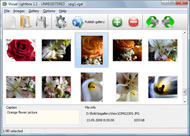



Overview
It's no secret that adding photos to your blog posts is one of the most effective ways to enhance your blog and attract attention to your writing. Flickr has millions of photos available in its database. A simple FREE tool called Flickr Gallery allows you to create a custom image gallery with a cool slide show of the most recent and most interesting photos from Flickr on your website or blog in a few easy steps. Just visit Flickr website and find photostream, photoset or a single photo you like. Enter the address of flickr page to add all photos from this page in your gallery, select the style of thumbnails and the overlay window and add the HTML embed code on your website or blog.A few clicks and you'll see a stylish photo gallery with beautifull lightbox and zoom effects on your own website or blog!


Want more?
- Flickr support
- jQuery plugin or Prototype extension
- Floating and smooth cross-fade transition
- Slideshow with autostart option
- Windows & MAC version
- XHTML compliant
- Zoom effect with overlay shadow
- Rounded corners of overlay window
- Large images fit to browser window
- A lot of nice gallery themes
- Image rotating and hi-quality image scaling with anti-aliasing
- Automatic thumbnail creation
- Adding caption
- Built-in FTP
Posts
- AI website generator and creator - get an AI generated website in minutes.
- AI website creator and generator - where AI and website design collide .
- Website Builder for Digital Marketing Agencies, Travel Agencies, Interior Designs
- Best Website Builder for Designers, Videos, Education, Software Companies
- Best Website Builder AIBest Free AI Website Builder - Create Website with AI
- Best Website Builder for Consultants, Magazines, Churches, Authors
Example
Lightbox gallery sample
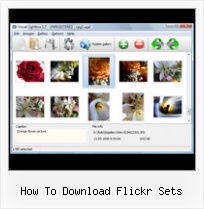
The following image set is generated by Flickr Gallery tool. Click any picture to run Lightbox gallery.




The example above is an in-page usage demo of Lightbox script with Flickr images. The lightbox gallery created with Flickr Gallery wizard is placed inside the page layout. You can also check the full-page demo gallery. This example takes whole browser area to show the website gallery.Show Captions In Flickr Slide Shows
How to Use
Step 1. Adding flickr images to your own gallery.
Locate the photo, photoset or photostream you want to use in your Flickr slideshow. Click on it to see the photo on its own page.
Copy URL of the flickr page.
Select Add images from Flickr... from the 'Add' button on the Toolbar.

In the appeared window paste URL of the flickr page. Specify also the number of photos you want to add from the flickr page. Flickr Gallery will now include these photos in your project.

If you have included the photos that you do not wish to be in your web gallery, you can easily remove them. Select all images that you wish to remove from photo gallery, and select Delete images. from the Images menu. You can pick and choose pictures by holding the CTRL while clicking the pictures you like.
Step 2. Adding caption.
The name of the photo on flickr page will automatically appear in the caption. When you select a photo you'll see the various info about it, such as: Path, Size, date of last change and Caption. You can add any comment or text about the photo (up to 512 symbols).

Step 3. Gallery properties.
Change the name of your flickr album, the size and quality of your pictures with Flickr Gallery. From the Gallery menu, select Properties or use "Edit Gallery Properties" button on the toolbar.
On the first tab of the Gallery Properties window you can change the name of your photo album and enable/disable the following properties: Slide Show, Auto play Slide Show, Zoom effect, Overlay Shadow. You can also set the Overlay shadow color and select the Engine you want to use (jQuery or Prototype + script.aculo.us).

On the second tab of the Gallery Properties window you can select the thumbnail you want to use, set the Thumbnails Resolution, Thumbnails Quality, Thumbnails Titles. Select Thumbnails Format (save in PNG or JPG format). Specify the Number of columns in you photo album and the Page color.

On the third tab of the Gallery Properties window you can select the template, Image resolution and Image quality of your pictures and change the Watermark.

You can set up the various sizes for exported images.

Control the quality of output PNG or JPEG format image by defining output "Image quality" and "Thumbnail quality" parameters (0%�100%).

Step 4. Save your photo gallery as project file.
When you exit Flickr Gallery application, you'll be asked if you want to save your project. The project consists of the pictures you choose to put on your web photo gallery and all your settings. It's a good idea to save the project, because that will allow you to change the project in case you decide to do something different with future galleries. So click Yes, then enter a name for your project. To select the location of your project, just click the Browse folders button and choose a different location. Then click Save.
Flickr Rss All Photo How To Download Flickr SetsDownload Flickr Gallery
 Download Free Edition Download Free Edition for Windows |  Download Free Edition Download Free Editionfor MAC |
Flickr Gallery is free for non - commercial use.
A small fee is required for business use. Flickr Gallery Business Edition additionally provides an option to remove the Flickr Gallery. Com credit string as well as a feature to put your own logo to images. After you finish the payment via the secure form, you will receive a license key instantly by e-mail that turns the Flickr Gallery Free Edition into a Business one. You can select the most suitable payment method: credit card, PayPal, check, bank transfer etc. Also you can get Business Edition for free if you help with translating Flickr Gallery into your native language, please contact us at  for more info.
|
| |||||||||||||||||||||||||||||||
Support
For general help, feature requests, troubleshooting contact Customer Support at . Make sure to include details on your operating system, browser, a link (or relevant code) and Flickr Gallery version.Upload Easy To Flickr From Etsy
Feedback
* I downloaded your trial version to see if I could get it to work with my website, and I am almost there (I have been looking for something like this for ages)..
* This looks like EXACTLY what I need for my site. It would make my job much faster! Love your program. Thank you!!
* I'm absolutely loving Flickr Gallery Business and Video LightBox. Amazing, quick and painless, to create a custom, browser independent gallery. And it works first time - every time! Best value for money I've seen in quite a while...Aperture Flickr Export Lite
* I'd like to express my gratitude to your efforts on creating such a nice piece of program and best of all it's free! Keep out the good work and I hope to see new features in the near coming future to rate you 5 star!
FAQ
Q:Is it possible to load a gallery from within image? So the gallery loads externally?
A:You should start the gallery onClick: <script type="text/javascript"> #vlightbox a{ #vlightbox a{
1) Add the following function into the <head> tag:
function showLightBox()
{ Lightbox.start(document.getElementById('firstImage'));}
</script>
<img src="thumbnail_gr.jpg" onClick="javascript:showLightBox()" title="Click to see the demo" style="cursor: pointer;">
3) Set the ID for any image in your gallery (id="firstImage"), for example add it to the first image:
<a rel="lightbox_vlb" href="data/images/dscn6831.jpg" title="dscn6831" id="firstImage">
4) Use 'display: none;' property for your gallery in engine\css\vlightbox.css. Just change the following code:
display:-moz-inline-stack;
display:inline-block;
zoom:1;
*display:inline;
position:relative;
vertical-align:top;
margin:3px;
width:160px;
font-family:Trebuchet,Tahoma,Arial,sans-serif;
font-size:11px;
font-weight:normal;
text-align:center;
opacity:0.87;
}
display:-moz-inline-stack;
display:none;
zoom:1;
*display:inline;
position:relative;
vertical-align:top;
margin:3px;
width:160px;
font-family:Trebuchet,Tahoma,Arial,sans-serif;
font-size:11px;
font-weight:normal;
text-align:center;
opacity:0.87;
}