



Overview

It's no secret that adding photos to your blog posts is one of the most effective ways to enhance your blog and attract attention to your writing. Flickr has millions of photos available in its database. A simple FREE tool called Flickr Gallery allows you to create a custom image gallery with a cool slide show of the most recent and most interesting photos from Flickr on your website or blog in a few easy steps. Just visit Flickr website and find photostream, photoset or a single photo you like. Enter the address of flickr page to add all photos from this page in your gallery, select the style of thumbnails and the overlay window and add the HTML embed code on your website or blog.
A few clicks and you'll see a stylish photo gallery with beautifull lightbox and zoom effects on your own website or blog!


Flickr Gallery for Windows   Flickr Gallery for MAC

Want more?

Example

Lightbox gallery sample

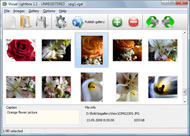
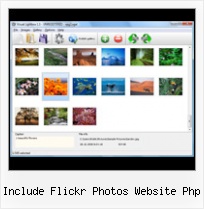
The following image set is generated by Flickr Gallery tool. Click any picture to run Lightbox gallery.

The sample above is an in-page usage demo of Lightbox with images from Flickr. The gallery created with Flickr Gallery application is placed inside the html page. You can also check the full-page demo lightbox gallery. This example takes whole browser area to show the website gallery.Flickr Slideshow Settings

How to Use

Step 1. Adding flickr images to your own gallery.


Locate the photo, photoset or photostream you want to use in your Flickr slideshow. Click on it to see the photo on its own page.

Copy URL of the flickr page.

Select Add images from Flickr... from the 'Add' button on the Toolbar.

Add images from Flickr

In the appeared window paste URL of the flickr page. Specify also the number of photos you want to add from the flickr page. Flickr Gallery will now include these photos in your project.

Add images from Flickr

If you have included the photos that you do not wish to be in your web gallery, you can easily remove them. Select all images that you wish to remove from photo gallery, and select Delete images. from the Images menu. You can pick and choose pictures by holding the CTRL while clicking the pictures you like.

Step 2. Adding caption.

The name of the photo on flickr page will automatically appear in the caption. When you select a photo you'll see the various info about it, such as: Path, Size, date of last change and Caption. You can add any comment or text about the photo (up to 512 symbols).

Step 3. Gallery properties.

Change the name of your flickr album, the size and quality of your pictures with Flickr Gallery. From the Gallery menu, select Properties or use "Edit Gallery Properties" button on the toolbar.

On the first tab of the Gallery Properties window you can change the name of your photo album and enable/disable the following properties: Slide Show, Auto play Slide Show, Zoom effect, Overlay Shadow. You can also set the Overlay shadow color and select the Engine you want to use (jQuery or Prototype + script.aculo.us).

On the second tab of the Gallery Properties window you can select the thumbnail you want to use, set the Thumbnails Resolution, Thumbnails Quality, Thumbnails Titles. Select Thumbnails Format (save in PNG or JPG format). Specify the Number of columns in you photo album and the Page color.

On the third tab of the Gallery Properties window you can select the template, Image resolution and Image quality of your pictures and change the Watermark.

You can set up the various sizes for exported images.

Control the quality of output PNG or JPEG format image by defining output "Image quality" and "Thumbnail quality" parameters (0%…100%).

Step 4. Save your photo gallery as project file.

When you exit Flickr Gallery application, you'll be asked if you want to save your project. The project consists of the pictures you choose to put on your web photo gallery and all your settings. It's a good idea to save the project, because that will allow you to change the project in case you decide to do something different with future galleries. So click Yes, then enter a name for your project. To select the location of your project, just click the Browse folders button and choose a different location. Then click Save.

Flickr Full Slideshow Include Flickr Photos Website Php

Download Flickr Gallery


Download Flickr Gallery Download Free Edition
for Windows
Download Flickr Gallery Download Free Edition
for MAC

Flickr Gallery is free for non - commercial use.

A small fee is required for business use. Flickr Gallery Business Edition additionally provides an option to remove the Flickr Gallery. Com credit string as well as a feature to put your own logo to images. After you conclude the payment via the secure form, you will receive a license key instantly by email that turns the Flickr Gallery Free Edition into a Business one. You can select the most appropriate payment method: credit card, bank transfer, PayPal, check etc. Also you can get Business Edition for free if you help with translating Flickr Gallery into your native language, please contact us at for more info.

Load Flickr Photostream On Personal Website

Buy Flickr GalleryBuy Business Edition
for Windows

$49
Single Website
$69
Unlimited Websites
Buy Flickr GalleryBuy Business Edition
for MAC

$49
Single Website
$69
Unlimited Websites

Support

For feature requests, troubleshooting, general help contact Customer Support at . Make sure to include details on your Flickr Gallery version, a link (or relevant code), browser and operating system.Create Html Invitation For Flickr

Feedback

    * I have just bought this product and think it is great. As it is extremely easy to use it is something I could get my clients to purchase to upload their own portfolio and latest projects etc.

    * I'd like to express my gratitude to your efforts on creating such a nice piece of program and best of all it's free! Keep out the good work and I hope to see new features in the near coming future to rate you 5 star!

    * I tried Flickr Gallery and for me its a very cool and usefull application. Its so easy to manage my galleries and it looks very nice.Get Flickr Page

    * First of all, I love you Flickr Gallery. I think it's beautiful! I purchased the lightbox “business edition” yesterday, and I’m very happy how easy it is to use. Found this to be one of the fastest ways to get a gallery on the web. Thanks.

FAQ

Q:How can I set the number of thumbnails columns?

A:Open the generated 'engine\css\vlightbox.css' in any text editor and specify the width for your gallery,
for example:

#vlightbox { zoom:1; width: 650px;}

Change this value to have a different number of columns.


RELATED

How to: Add a Styled Flickr Photo Stream to Your Blog Adding uniquely-styled Flickr photo streams to your blog is easy, and it's just another thing you can leverage to make your blog stand out among the crowd. Today, my goal is simply to walk you through the process of creating

a flickr Free Download - script software a flickr Free Download - script software at WareSeeker.com - Flickr RSS Reader v3 is an application built in Macromedia Flash MX 2004 Professional. This application reads RSS Feeds from www.flickr.com. This version runs on your website

Reading RSS with PHP | Blog | Ennui Design " An Ongoing Reading RSS with PHP. Displaying Photos from Your Flickr Page on Your Website. The Problem. The Internet seems to be getting easier everyday. In a moment we'll use this URL to load our Flickr page into our website. But first, we need to tell our site how

Flickr Services Flickr is almost certainly the best online photo management and sharing application in the world. Show off your favorite photos and videos to the world, securely and privately show content to your friends and family, or blog the photos and videos

Flickr Import - JavaScript - CodeCanyon Flickr Import is an extremely lightweight, quick and robust tool to display photos from Flickr onto your website. Features Include: Version 1.2.3 • Added minor updates to support Fancybox rel tags

How To Include Your Flickr Photos In WordPress | Marco Luthe Thanks to Tim I found a nice wordpress plugin called FAlbum which helps you including your Flickr photos in your wordpress project: FAlbum

Flcikr Photo Thumbnails Creator flickr api, flickr badge, flickr preview, flickr thumbnail and options, check Flickr's feed service page, or check my Python version to see an example of using Flickr API methods. How to display Flickr photos at my website or blog. Step 1. Download FlickrBadge.zip (PHP and Ajax script

Downloading Flickr Photosets | DSLRBLOG - Photography I'm lucky that I religiously upload all my ok photographs to Flickr rather than just my best ones. While I have been criticised more than once for this practice it just saved me a lot of grief. After deciding the photolabs to go with we needed to

Integrating Flickr Photostreams with PHP using the Zend Framework Installing the framework is typically as simple as uncompressing the distribution archive and adding the location of the resulting Zend/ directory to the PHP include path. Second, you need a Flickr API key. and returns an XML-encoded result of photos matching these parameters

flickr Thumbnails on Your Website – shapeshift.net Find your Flickr user or group id at idgettr.com. You also need to add the following code to your CSS. div.pics .flickr_badge_image img {width:100px; height:100px; border:0;} Include Recent flickr Photos with PHP. This is a good source for information of how to hack the flickr badge id code

Scripts Mashup - search flickr on your website - Flickr php Add Flickr search to your website - Show your flickr photos Creation of php scripts and ajax scripts containing external multimedia and web aplications for your website

How to Get the Most from Flickr | eHow.com How to Get the Most from Flickr. Use the options provided by Flickr to do great things with your photos like make books or cards. There are growing numbers of software programs that use Flickr photos in exciting ways

Flickrbits "1001 is a desktop client to be used in conjunction with Flickr, the online photo-sharing website. flickr search engine to include in your website. show your flickr photos or allow search flickr pictures inside your own website

phpFlickr - Posted in Web Site News. 3 comments. By Dan – March 18, 2009. phpFlickr 2.3.0.1. I've put up a new version of phpFlickr to include all API methods and new arguments for existing methods. Below, I've posted a list of all of the PHP (compatible with PHP4 and PHP5) to act as a wrapper for Flickr's

Ajax requests using jQuery and PHP | Web Development Blog Our last tutorial about the flickr API was an example on how-to search the flickr photo database for images using some short PHP code. This time we will use

How to add a Flickr-based photo gallery to your website With the growing popularity of using Flickr to manage photos, more and more people are looking for an easy way to display these photos on their website. After some playing around, I've settled with the phpFlickr and Lightbox combination to nicely display photo galleries on a website

eeFlickr 0.6.7 beta - ExpressionEngine Flickr Gallery - php ExpressionEngine Flickr Gallery - php flickr gallery + Photo Blog. eeFlickr is a Module visitors to sort browse your Flickr photos however you wish using ExpressionEngines

php, caching and the flickr api | allthegoodness.com The website and photoblog of Mark Zeman and Katie McAlpine from Wellington, New Zealand. flickr world map. Two very useful and easy to use php libraries are need to make this example work, MiniXML and Cache Lite. Cache Lite is a PEAR extension but you can simply download the source and include "

How to Create a Photo Gallery using the Flickr API | Nettuts+ Flickr is, without doubt, the biggest and best photography website on the internet. There are lots of widgets, badges and plugins which allow you to display The files process the data provided by Flickr and return arrays in PHP, which we use to display our photos

Web Design Schools Guide Link to your own site within the photo: Be sure to add a link within your photo's description to get traffic back to your website. Use Flickr as hosting: Store your photos on Flickr, and link directly to them to take a load off of your server

Flickr - Wikipedia, the free encyclopedia Flickr is an image hosting and video hosting website, web services suite, and online community created by Ludicorp and later In May 2009, White House official photographer Pete Souza began using Flickr as a conduit for releasing White House photos

Flickr API Fun - Rasmus' Toys Page This entry will focus on my PHP wrapper for the Flickr API. It is based on Cal's version and is compatible You could also write alternative frontends for it and integrate your Flickr photos with your own web site

Include Recent flickr Photos with PHP Main | Defining CSS Constants with PHP " December 13, 2005. Include Recent flickr Photos with PHP. Putting your recent flickr photos on your website or blog is a quick and easy way to share them with the world and keep your site looking fresh. flickr gives you two options to do this

David Little, Web Developer Warning: include() [function.include]: Failed opening '/home/littled/public_html/includes/googleff.php' for inclusion (include_path='.:/usr/lib/php:/usr/local/lib/php') in /home/littled/public_html/phpflickr/leftnav-new.php on This page uses an Ajax script to fetch photos from the Flickr website

Trading Card: Turn your photos into trading cards! Immortalize someone you love by putting their face on their very own collectible trading card! Or make a whole deck and create a card game. The possibilities for embarrassment are virtually limitless! I know I'm embarrassed!

How To Add Flickr To Wordpress In 5 Simple Steps | A Go to your Flickr homepage and click "Your Photostream" Grab those last numbers and letters after "photos/" Step 2: Open up your header.php file and add these javascript snippets in between your head tags. This is to include jQuery on your site

