
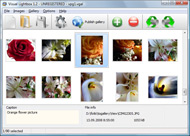
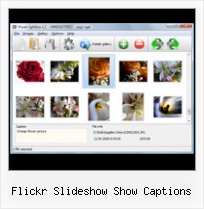



Overview

It's no secret that adding photos to your blog posts is one of the most effective ways to enhance your blog and attract attention to your writing. Flickr has millions of photos available in its database. A simple FREE tool called Flickr Gallery allows you to create a custom image gallery with a cool slide show of the most recent and most interesting photos from Flickr on your website or blog in a few easy steps. Just visit Flickr website and find photostream, photoset or a single photo you like. Enter the address of flickr page to add all photos from this page in your gallery, select the style of thumbnails and the overlay window and add the HTML embed code on your website or blog.
A few clicks and you'll see a stylish photo gallery with beautifull lightbox and zoom effects on your own website or blog!


Flickr Gallery for Windows   Flickr Gallery for MAC

Want more?

Example

Lightbox gallery sample

The following image set is generated by Flickr Gallery tool. Click any picture to run Lightbox gallery.

The example above is an in-page usage demo of Lightbox gallery that uses images from Flickr. The website gallery created with Flickr Gallery application is placed inside the html page. You can also check the full-page demo gallery. This example takes whole browser area to show the web gallery.Auto Loop Flickr Slideshow Embed

How to Use

Step 1. Adding flickr images to your own gallery.


Locate the photo, photoset or photostream you want to use in your Flickr slideshow. Click on it to see the photo on its own page.

Copy URL of the flickr page.

Select Add images from Flickr... from the 'Add' button on the Toolbar.

Add images from Flickr

In the appeared window paste URL of the flickr page. Specify also the number of photos you want to add from the flickr page. Flickr Gallery will now include these photos in your project.

Add images from Flickr

If you have included the photos that you do not wish to be in your web gallery, you can easily remove them. Select all images that you wish to remove from photo gallery, and select Delete images. from the Images menu. You can pick and choose pictures by holding the CTRL while clicking the pictures you like.

Step 2. Adding caption.

The name of the photo on flickr page will automatically appear in the caption. When you select a photo you'll see the various info about it, such as: Path, Size, date of last change and Caption. You can add any comment or text about the photo (up to 512 symbols).

Step 3. Gallery properties.

Change the name of your flickr album, the size and quality of your pictures with Flickr Gallery. From the Gallery menu, select Properties or use "Edit Gallery Properties" button on the toolbar.

On the first tab of the Gallery Properties window you can change the name of your photo album and enable/disable the following properties: Slide Show, Auto play Slide Show, Zoom effect, Overlay Shadow. You can also set the Overlay shadow color and select the Engine you want to use (jQuery or Prototype + script.aculo.us).

On the second tab of the Gallery Properties window you can select the thumbnail you want to use, set the Thumbnails Resolution, Thumbnails Quality, Thumbnails Titles. Select Thumbnails Format (save in PNG or JPG format). Specify the Number of columns in you photo album and the Page color.

On the third tab of the Gallery Properties window you can select the template, Image resolution and Image quality of your pictures and change the Watermark.

You can set up the various sizes for exported images.

Control the quality of output PNG or JPEG format image by defining output "Image quality" and "Thumbnail quality" parameters (0%…100%).

Step 4. Save your photo gallery as project file.

When you exit Flickr Gallery application, you'll be asked if you want to save your project. The project consists of the pictures you choose to put on your web photo gallery and all your settings. It's a good idea to save the project, because that will allow you to change the project in case you decide to do something different with future galleries. So click Yes, then enter a name for your project. To select the location of your project, just click the Browse folders button and choose a different location. Then click Save.

Flickrexport For Aperture Flickr Slideshow Show Captions

Download Flickr Gallery


Download Flickr Gallery Download Free Edition
for Windows
Download Flickr Gallery Download Free Edition
for MAC

Flickr Gallery is free for non - commercial use.

A small fee is required for business use. Flickr Gallery Business Edition additionally provides an option to remove the Flickr Gallery. Com credit string as well as a feature to put your own logo to images. After you conclude the payment via the secure form, you will receive a license key instantly by e-mail that turns the Flickr Gallery Free Edition into a Business one. You can select the most suitable payment method: check, bank transfer, credit card, PayPal etc. Also you can get Business Edition for free if you help with translating Flickr Gallery into your native language, please contact us at for more info.

Joomla Flickr Plugin Example

Buy Flickr GalleryBuy Business Edition
for Windows

$49
Single Website
$69
Unlimited Websites
Buy Flickr GalleryBuy Business Edition
for MAC

$49
Single Website
$69
Unlimited Websites

Support

For general help, troubleshooting and feature requests contact Customer Support at . Make sure to include details on your operating system, browser, a link (or relevant code) and Flickr Gallery version.Automatically Starting Embedded Flickr Slideshow

Feedback

    * Just bought the business version of Flickr Gallery and I just had to write and say how impressed I am with it. Really easy to use, intuitive interface and generates a truly professional presentation. Seldom have I been so pleased with a software purchase. Thank you.

    * Let me start just congratulating you, good job, really. I am trying out the free version before I buy it. It works great.

    * I have just bought this product and think it is great. As it is extremely easy to use it is something I could get my clients to purchase to upload their own portfolio and latest projects etc.Delete Photo Flickr

    * I have purchased the business and LOVE IT..Your product appears easy to use and close to what I need to help several of my clients..

FAQ

Q:How can I set the number of thumbnails columns?

A:Open the generated 'engine\css\vlightbox.css' in any text editor and specify the width for your gallery,
for example:

#vlightbox { zoom:1; width: 650px;}

Change this value to have a different number of columns.


RELATED

Flickr Releases Handy Embeddable Slide Show Yahoo's photosharing service Flickr is one of the more wonderful things on the web and today the company made a small release that a lot of people should

Free SlideShow Maker. Visual JavaScript SlideShow Free SlideShow Maker. Create awesome web slideshows in second without a line of code. When you add images from Flickr its name will appear in caption automatically

Slickr Flickr Wordpress Plugin for displaying a slideshow or Slickr Flickr Plugin Homepage has installation and usage notes, screenshots and customization instructions plus links to FAQ, known issues and tips and best practices

MySlideShow Review and Download,Photo Slide Show,Graphics MySlideShow Download,Photo Slide Show Software,MySlideShow allows you to create and play slide shows on your PC and DVD player

lib20 / flickr-slide-shows Badge can also pull from a flickr group or from specific tags. Select photos based on user, sets, tags and more. Size of slideshow can be customized

Spanish GP slideshow : James Allen on F1 – The official website We are experimenting with ways we can work together on content and this is a Flickr slideshow with my captions. and click on "Show info" to get the captions. (You will need the latest Flash plug-in installed and your browsers might prefer to go directly to the JAF1 Flickr pages)

embedding flickr slideshows with video into your blog — a Flickr slide shows are not the most elegant, but with the ability to add video, what a great addition this can be to your blog or website! on a travel site or real estate site, to show a I have found, going back in and editing my post after adding the flickr slide show can break the slide show

Looking for a free photo site with slide show captions Archived from groups: alt.games.microsoft.flight-sim (More info?) It seems to me someone posted a screenshot slideshow that I liked earlier this month on a free photo site and I forgot to bookmar

Card of the Week.com | Cards, Scrapbooking, and Papercrafts: CHA DSC_0072_0337.JPG Originally uploaded by Barefootstamper Here's the sign above the front door . just to get you in the mood. Here's the Flickr slide show. I created captions of what everything -- i hope they show up. Things I think you'll

Vertigo: Slide.Show Slideshow data from XML, Flickr, or your own custom provider "I just wanted to put a slideshow with some pictures of my dog and my house in the snow on the interweb. The hardest thing was selecting the pictures, putting some cool captions in the data file and waiting

How To Use Slickr Flickr To Create a Slideshow Or Gallery Step by step instructions of how to get the most of the Flickr photos using slideshows and galleries descriptions – on or off (default off) – show the photo description underneath the caption. attribution – line that can be used to credit the photographer above the slideshow or gallery

k12learning20 - 11-slideshow Thing 12 (Week 5): Create a Slideshow! Introduction. In Thing 11, you explored Flickr and selected several digital photos from the In this thing, you are invited to use your selected Flickr photos to create and embed a slideshow

Jquery Flash Slide Show : Free Flash SlideShow Maker Flash SlideShow w/o Flash! Jquery Flash Slide Show. Don't allow your web site visitors to get lost! Try Flickr Slideshow!. flash slideshow with uiloader Caption - you can enter any comment or text about the image in the website photo gallery.When you add images from Flickr its name will appear in

Download Free Photo SlideShow Software at All Freeware Free Photo SlideShow Software 1.0 free download, review. Free SlideShow Builder is a free slideshow software that helps you easily generate delicious photo slideshows with gorgeous transition effects, in a few clicks without writing a single line

How to Embed a Picasa Slideshow into a Personal Blog | eHow.com How to Embed a Picasa Slideshow into a Personal Blog. Picasa is Google's free photo software. With Picasa, you can organize, edit and share your pictures. They have recently updated their features so that you can take a Picasa slideshow and embed

Flickr: "captions" Flickr is almost certainly the best online photo management and sharing application in the world. Show off your favorite photos and videos to the world, securely and privately show content to your friends and family, or blog the photos and videos

Flickr Slideshow Tutorial | Hammock Dreams This tutorial covers how to add Flickr slideshows to your blog entries, it's WordPress-centric, since that's the blog system I use, but you can definitely apply

Flickr's own embeddable slide show – pafa.net There aren't too many options with the slideshow, currently just the size of the slideshow can be changed. There aren't any photo captions or links back to your flickr account. No doubt flickr will add features as time goes by. Check out the

Spanish GP slideshow " We are experimenting with ways we can work together on content and this is a Flickr slideshow with my captions. For maximum impact, expand it to full screen and click on "Show info" to get the captions. (You will need the latest Flash plug-in

Widgetbox " AOL Picture Album Viewer (Slide Show Format) Widget Get the AOL Picture Album Viewer (Slide Show Format) widget on Widgetbox.com! Show your AOL photo albums on your blog in a slideshow format

Flickr: Using Pictures on Your Web Site | AssortedStuff Many people know flickr as a wonderful site for storing and sharing pictures and as a photo community. It is that, of course, but you can also use flick

Making Descriptions show by default in an embedded Flickr How to make descriptions show automatically in a Flickr Slideshow that's embedded on a Web page. I just set up a Flickr slideshow and the client asked if the descriptions (captions) could show by default

Reports from Davao and elsewhere For now, enjoy the slideshow! To see the captions, click the "Show info" link on top right of page. Warning: If you want to view the captions, please click the Flickr link, Slideshow, and 'Show Info' at the top-left of

HOW TO Quickie: Embedded Flickr Slideshows — PaulStamatiou.com And for those wondering, there is no way to adjust the size of the flash slideshow as it is fixed in size and hosted on flickr. Do you have any idea how to caption the photos, either in the slideshow or back at Flickr?

Flickr Gallery With Captions : Flickr Gallery Flickr Gallery With Captions. Flickr Gallery. The most powerful web gallery software on the Web.. Reposition Flickr Badge On Tumblr

Ajax Slideshow Caption Zoom : Free SlideShow Software Free Slideshow Creator! Ajax Slideshow Caption Zoom. Just upload files generated by the photo album builder to your server and it will run immediately, even if it's a free host without php, mysql, asp support!. Web Page Photo Album Code

