
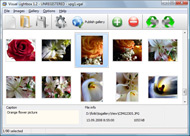



Overview

It's no secret that adding photos to your blog posts is one of the most effective ways to enhance your blog and attract attention to your writing. Flickr has millions of photos available in its database. A simple FREE tool called Flickr Gallery allows you to create a custom image gallery with a cool slide show of the most recent and most interesting photos from Flickr on your website or blog in a few easy steps. Just visit Flickr website and find photostream, photoset or a single photo you like. Enter the address of flickr page to add all photos from this page in your gallery, select the style of thumbnails and the overlay window and add the HTML embed code on your website or blog.
A few clicks and you'll see a stylish photo gallery with beautifull lightbox and zoom effects on your own website or blog!


Flickr Gallery for Windows   Flickr Gallery for MAC

Want more?

Example

Lightbox gallery sample

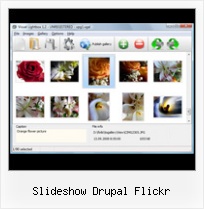
The following image set is generated by Flickr Gallery tool. Click any picture to run Lightbox gallery.

The sample above is an in-page usage demo of Lightbox gallery that uses images from Flickr. The slideshow created with Flickr Gallery software is placed inside the page layout. You can also check the full-page demo website gallery. This example takes whole browser area to show the web gallery.Find High Resolution Images On Flickr

How to Use

Step 1. Adding flickr images to your own gallery.


Locate the photo, photoset or photostream you want to use in your Flickr slideshow. Click on it to see the photo on its own page.

Copy URL of the flickr page.

Select Add images from Flickr... from the 'Add' button on the Toolbar.

Add images from Flickr

In the appeared window paste URL of the flickr page. Specify also the number of photos you want to add from the flickr page. Flickr Gallery will now include these photos in your project.

Add images from Flickr

If you have included the photos that you do not wish to be in your web gallery, you can easily remove them. Select all images that you wish to remove from photo gallery, and select Delete images. from the Images menu. You can pick and choose pictures by holding the CTRL while clicking the pictures you like.

Step 2. Adding caption.

The name of the photo on flickr page will automatically appear in the caption. When you select a photo you'll see the various info about it, such as: Path, Size, date of last change and Caption. You can add any comment or text about the photo (up to 512 symbols).

Step 3. Gallery properties.

Change the name of your flickr album, the size and quality of your pictures with Flickr Gallery. From the Gallery menu, select Properties or use "Edit Gallery Properties" button on the toolbar.

On the first tab of the Gallery Properties window you can change the name of your photo album and enable/disable the following properties: Slide Show, Auto play Slide Show, Zoom effect, Overlay Shadow. You can also set the Overlay shadow color and select the Engine you want to use (jQuery or Prototype + script.aculo.us).

On the second tab of the Gallery Properties window you can select the thumbnail you want to use, set the Thumbnails Resolution, Thumbnails Quality, Thumbnails Titles. Select Thumbnails Format (save in PNG or JPG format). Specify the Number of columns in you photo album and the Page color.

On the third tab of the Gallery Properties window you can select the template, Image resolution and Image quality of your pictures and change the Watermark.

You can set up the various sizes for exported images.

Control the quality of output PNG or JPEG format image by defining output "Image quality" and "Thumbnail quality" parameters (0%…100%).

Step 4. Save your photo gallery as project file.

When you exit Flickr Gallery application, you'll be asked if you want to save your project. The project consists of the pictures you choose to put on your web photo gallery and all your settings. It's a good idea to save the project, because that will allow you to change the project in case you decide to do something different with future galleries. So click Yes, then enter a name for your project. To select the location of your project, just click the Browse folders button and choose a different location. Then click Save.

Galleria Pass Flickr Secret Slideshow Drupal Flickr

Download Flickr Gallery


Download Flickr Gallery Download Free Edition
for Windows
Download Flickr Gallery Download Free Edition
for MAC

Flickr Gallery is free for non-commercial use.

A small fee is required for business use. Flickr Gallery Business Edition additionally provides an option to remove the Flickr Gallery. Com credit bar as well as a feature to put your own logo to images. After you conclude the payment via the secure order form, you will receive a license key instantly by e-mail that turns the Flickr Gallery Free Edition into a Business one. You can select the most appropriate payment mode: bank transfer, check, credit card, PayPal etc. Also you can get Business Edition for free if you help with translating Flickr Gallery into your native language, please contact us at for more info.

Flickr Sync Tool Mac

Buy Flickr GalleryBuy Business Edition
for Windows

$49
Single Website
$69
Unlimited Websites
Buy Flickr GalleryBuy Business Edition
for MAC

$49
Single Website
$69
Unlimited Websites

Support

For general help, troubleshooting and feature requests contact Customer Support at . Make sure to include details on your operating system, browser, Flickr Gallery version and a link (or relevant code).Embed Annotated Flickr Images

Feedback

    * I would like to say that Flickr Gallery is a stunning lil program! Its almost too good to be true i'd say! I've been looking for tutorials to create a lightbox gallery, but just couldnt come right. Im so glad i found Flickr Gallery!

    * I just tried the application, It is wonderful idea. Like you said in the website "few clicks without writing a single line of code" because most of the people is not web designers".

    * Another programmes have incredible functionality but no fantastic interface like your product!Flickr Group Pool Javascript

    * I have installed Flickr Gallery to trial. All good, loving it!! I want to get an business version of your great programm. I love it - soo easy to use!!

FAQ

Q:How do I embed the lightbox image gallery into an existing page?

A:To install Flickr Gallery gallery on your page you should:

1. Create your gallery in Flickr Gallery and publish it on a local drive in any test folder.
2. Open index.html file from the saved folder in any text editor.
3. Copy code for the HEAD section and paste it inside the HEAD section of you own webpage, for example:

<head>
...
<!-- Start Flickr Gallery.com HEAD section -->
<link rel="stylesheet" href="engine/css/vlightbox.css" type="text/css" />
<style>#vlightbox a#vlb{display:none}</style>
<link rel="stylesheet" href="engine/css/Flickr Gallery.css" type="text/css" media="screen" />
<script src="engine/js/jquery.js" type="text/javascript"></script>
<script src="engine/js/jquery.tools.min.js" type="text/javascript"></script>
<script src="engine/js/visuallightbox.js" type="text/javascript"></script>
<!-- End Flickr Gallery.com HEAD section -->

...
</head>


4. Copy code for the BODY section and paste it inside the Body section of you own webpage in the place where you want to have a gallery, for example:

<body>
...
<!-- Start Flickr Gallery.com BODY section -->
<div id="vlightbox">
<a rel="lightbox_vlb" href="data/images/dscn6831.jpg" title="DSCN6831"><img src="data/thumbnails/dscn6831.png"><span></span></a>
<a rel="lightbox_vlb" href="data/images/dscn6823.jpg" title="DSCN6823"><img src="data/thumbnails/dscn6823.png"><span></span></a>
<a rel="lightbox_vlb" href="data/images/dscn6819.jpg" title="DSCN6819"><img src="data/thumbnails/dscn6819.png"><span></span></a>
<a id="vlb" href="http://Flickr Gallery.com">Photo Gallery For Web by Flickr Gallery.com v2.1</a>
</div>
<!-- End Flickr Gallery.com BODY section -->

...
</body>


5. Copy 'data' folder with images and thumbnails and 'engine' folder with .css and .js files into the same folder with your own webpage.
You can find the example on our website:
http://www.Flickr Gallery.com/#example


RELATED

Flickr Gallery - Drupal Module Reviews and Ratings Flickr Gallery Drupal module. This module was inspired by Angie Byron's article at lullabot.com on How to create Flickr in Drupal. It automates

Flickr: "drupal" Flickr is almost certainly the best online photo management and sharing application in the world. Show off your favorite photos and videos to the world, securely and privately show content to your friends and family, or blog the photos and videos

Flickr CCK | drupal.org If you have the Slideshow Creator module installed, you also have the option to create a javascript slideshow of flickr images. slideshow in the node, you could have a block that displays the flickr show as a badge or mini-slideshow

drupal Links to Articles about Luna Bliss Sims. The Gardener's Vista, Prim Perfect Magazine 2009 Visit Luna Bliss' Flickr page. Install Drupal web hosting. Recent blog posts. First signs of

Implementing Flickr Slideshow Links By Theming Flickr.module I've implemented a "slideshow" feature on the photosets in the Photography section of this site (and in blog posts that feature photosets). This feature links to Flickr's built-in slideshow by theming the output of the Flickr module for Drupal:

Free image slideshow download - image slideshow script - Top slideshow generating Flickr stream embed code slideshow generating Flickr image slideshow slide show drupal cck image slideshow slide. Shadowbox

Flash Slideshow Generator Freeware : Free Flash SlideShow Maker Flash SlideShow w/o Flash! Flash Slideshow Generator Freeware. Flash SlideShow Maker is the first software that creates AJAX-powered online image galleries without the need for server-side setup.. Flash Slideshow Maker Templates

DrupalCampPDX 2008 | Portland Drupalers Photos tagged drupalcamppdx08 from flickr. More photos or view a slide show. Drupal Camp PDX 2009, October 9-11. For the latest We're a little amazed at the momentum surrounding this Saturday's Drupal Camp PDX 08. What started as a few rough ideas for

Community | DrupalConParis2009 Wondering about what I've paid for. Talking about Drupal, drinking some beer, meeting people and seeing Paris by night. September Find out more on the flickr group (credit : flickrSLiDR)

Picture Moblogging with flickr and drupal | Matt Farina Drupal. tech. Picture moblogging is one of the easiest and most addictive things one can do Building a moblog with flickr is one of the easiest ways to go. After listening to the G&G minicast on

Slideshow in a node based on CCK images | Drupal.co.in | CMS Hello, I have searched the forums and modules but was not successful to find a module that can achieve the following: I would like for users to be able to upload a number of images with a CCK imagefield and then upon saving the node would show an

How to build Flickr in Drupal | Lullabot How to build Flickr in Drupal. Article by Angie Byron August 16, 2006 a dash of theming magic, you too can have your very own Flickr clone

Flickr - download tag - Softpedia This Drupal module turns flickr photos into drupal nodes, imported from flickr via the xml api. Placing a Flickr Slideshow script allows you to place a Flickr Slideshow in your page

Integrating Flickr and SlideShow Pro | VentureWeb Design Ltd My favourite integration is probably Olly's modified Drupal module that we used on Doglotion.com's flickr gallery, which automatically pulls in all new photo sets and displays them with lightbox. But some clients still prefer the Slideshow Pro

Slideshow from a Flickr account | NEW ENGLAND NEWS FORUM static.flickr.com/178/460212202_ in /var/www/html/drupal/includes This is an example of a slideshow from a Flickr account: login or register to post comments | printer friendly version. Archives of affiliated events: Search. New forum topics. OPINION: Does

Camp History | DrupalCamp LA 2010 Discussion on Women in Open Source/Drupal, and audio highlights from that discussion can and the members of LA Drupal. Powered by Drupal | Copyright © 2009-2010. Graciously hosted

Drupal Recipes: Building Image Galleries with jQuery and Flickr Covering Flickr, jQuery, and Drupal best practices

How to embed Flickr slideshows and add Shadow box for added How to embed Flickr slideshows and add Shadow box for added awesomeness I'm using the Drupal Shadowbox plugin but there is also a Lightbox plugin as well. You can get Shadowbox for WordPress here. Ok after you get Shadowbox installed 1. Setup the slideshow thumbnail. Get the URL of the image that

Passing the Word - College of Creative Arts - San Francisco Updates, tips, tutorials, and help from the College of Creative Arts website administrator. demonstrate how to add an image to a content page in Drupal using HTML code automatically generated by Flickr

Create a Drupal Photo Gallery Using Flickr, CCK & Views Drupal-focused web development blog. Featuring tips, tricks and solutions to help you build websites with Drupal

Easiest way to add Flickr to Drupal | Geeks & God First things first, I'm a total Drupal n00b. Never touched it before last weekend, but now I'm hooked and trying to setup a website for my church. One easy way to embed a flickr slideshow is to use this website:

flickr slideshow from ubuntu4life | ubuntu for life flickr slideshow from ubuntu4life. By ubuntu4l - Posted on February 26th, 2008. Just made the http://flickr-slideshow.ubuntu4life.com/ ,you can find it's effect on rightside of this blog. Any suggest or bug please contact me. How to remove the somebody's blog link under the Drupal blog node

15 Userful Views Module for Drupal - Ntt.cc An upgrade path from Drupal 5 is forthcoming. Maintainer:Todd Nienkerk. Links:Project Page. 11.Flickr CCK. This module will install If you have the Slideshow Creator module installed, you also have the option to create a javascript slideshow of flickr images

Paid Drupal Jobs | drupal drive drupal drive

Best Flickr Slideshow Embed : Flickr Gallery Best Flickr Slideshow Embed. Create an effective online photo galleries with Flickr Slideshow!. Flickr Badge For Email Signature

