
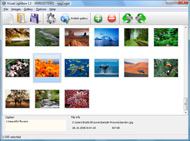


Overview

It's no secret that adding photos to your blog posts is one of the most effective ways to enhance your blog and attract attention to your writing. Flickr has millions of photos available in its database. A simple FREE tool called Flickr Gallery allows you to create a custom image gallery with a cool slide show of the most recent and most interesting photos from Flickr on your website or blog in a few easy steps. Just visit Flickr website and find photostream, photoset or a single photo you like. Enter the address of flickr page to add all photos from this page in your gallery, select the style of thumbnails and the overlay window and add the HTML embed code on your website or blog.
A few clicks and you'll see a stylish photo gallery with beautifull lightbox and zoom effects on your own website or blog!


Flickr Gallery for Windows   Flickr Gallery for MAC

Want more?

Example

Lightbox gallery sample

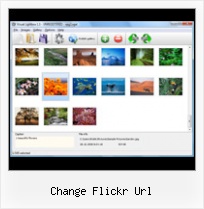
The following image set is generated by Flickr Gallery tool. Click any picture to run Lightbox gallery.

The photo gallery above is an in-page usage demo of Lightbox gallery that uses images from Flickr. The website gallery created with Flickr Gallery application is placed inside the page layout. You can also check the full-page demo slideshow. This example takes whole browser area to show the Lightbox gallery that uses images from Flickr.Flickr Gallery Plugin Joomla

How to Use

Step 1. Adding flickr images to your own gallery.


Locate the photo, photoset or photostream you want to use in your Flickr slideshow. Click on it to see the photo on its own page.

Copy URL of the flickr page.

Select Add images from Flickr... from the 'Add' button on the Toolbar.

Add images from Flickr

In the appeared window paste URL of the flickr page. Specify also the number of photos you want to add from the flickr page. Flickr Gallery will now include these photos in your project.

Add images from Flickr

If you have included the photos that you do not wish to be in your web gallery, you can easily remove them. Select all images that you wish to remove from photo gallery, and select Delete images. from the Images menu. You can pick and choose pictures by holding the CTRL while clicking the pictures you like.

Step 2. Adding caption.

The name of the photo on flickr page will automatically appear in the caption. When you select a photo you'll see the various info about it, such as: Path, Size, date of last change and Caption. You can add any comment or text about the photo (up to 512 symbols).

Step 3. Gallery properties.

Change the name of your flickr album, the size and quality of your pictures with Flickr Gallery. From the Gallery menu, select Properties or use "Edit Gallery Properties" button on the toolbar.

On the first tab of the Gallery Properties window you can change the name of your photo album and enable/disable the following properties: Slide Show, Auto play Slide Show, Zoom effect, Overlay Shadow. You can also set the Overlay shadow color and select the Engine you want to use (jQuery or Prototype + script.aculo.us).

On the second tab of the Gallery Properties window you can select the thumbnail you want to use, set the Thumbnails Resolution, Thumbnails Quality, Thumbnails Titles. Select Thumbnails Format (save in PNG or JPG format). Specify the Number of columns in you photo album and the Page color.

On the third tab of the Gallery Properties window you can select the template, Image resolution and Image quality of your pictures and change the Watermark.

You can set up the various sizes for exported images.

Control the quality of output PNG or JPEG format image by defining output "Image quality" and "Thumbnail quality" parameters (0%…100%).

Step 4. Save your photo gallery as project file.

When you exit Flickr Gallery application, you'll be asked if you want to save your project. The project consists of the pictures you choose to put on your web photo gallery and all your settings. It's a good idea to save the project, because that will allow you to change the project in case you decide to do something different with future galleries. So click Yes, then enter a name for your project. To select the location of your project, just click the Browse folders button and choose a different location. Then click Save.

Embed Flickr Stream Lightbox Change Flickr Url

Download Flickr Gallery


Download Flickr Gallery Download Free Edition
for Windows
Download Flickr Gallery Download Free Edition
for MAC

Flickr Gallery is free for non - commercial use.

A small fee is required for business use. Flickr Gallery Business Edition additionally provides an option to remove the Flickr Gallery. Com credit bar as well as a feature to put your own logo to images. After you finish the payment via the secure form, you will receive a license key instantly by email that turns the Flickr Gallery Free Edition into a Business one. You can select the most appropriate payment method: bank transfer, PayPal, credit card, check etc. Also you can get Business Edition for free if you help with translating Flickr Gallery into your native language, please contact us at for more info.

Embed Flickr Account

Buy Flickr GalleryBuy Business Edition
for Windows

$49
Single Website
$69
Unlimited Websites
Buy Flickr GalleryBuy Business Edition
for MAC

$49
Single Website
$69
Unlimited Websites

Support

For general help, troubleshooting and feature requests contact Customer Support at . Make sure to include details on your browser, operating system, a link (or relevant code) and Flickr Gallery version.Change Embedded Flickr Gallery Css

Feedback

    * I have installed Flickr Gallery to trial. All good, loving it!! I want to get an business version of your great programm. I love it - soo easy to use!!

    * Another programmes have incredible functionality but no fantastic interface like your product!

    * First of all, I love you Flickr Gallery. I think it's beautiful! I purchased the lightbox “business edition” yesterday, and I’m very happy how easy it is to use. Found this to be one of the fastest ways to get a gallery on the web. Thanks.Flickr Doing Justice

    * I am thrilled with what this tool can do for me thanks for all the hard work that must have gone into it.

FAQ

Q:I purchased your business license today but I don't see any way to update so the watermark is either missing or replace with mine.What do I do?

A:Free edition of Flickr Gallery doesn't allow you to remove our watermark.

Register your Flickr Gallery application at first. Use reg. key from the license message you received after the purchase. After the registration you can remove watermarks.

Open Gallery->Properties->Templates: Watermark. Click to disable this option or use your own watermark.


RELATED

Change? | Flickr - Photo Sharing! by jimmyhickey1, on Flickr[/url]

flickr Flickr Slideshow is one freeware to create flickr photo slideshow, it flickrslideshow.com. Just input the URL address of your Flickr page,

ChangeDetection - Change Log: Flickr: The Help Forum: Upload Latest: 7 hours ago Nuova versione Flickr Latest: 7 hours ago Foto in sequenza Latest: 8 entrare come marpos83 Latest: 10 hours ago url Latest: 13 hours ago Set fantasma Latest:

LawGeek: NetSquared's "I Want Change" Flickr group Open Source World Domination Originally uploaded by net2photos. NetSquared, a project devoted to "Remixing the Web for Social Change" has launched an interesting new group on Flickr called I Want Change. It's a collection of photos with people

how can i change my flickr URL? like instead of it being You can do it, but I can't tell you how. Since I changed mine, Flickr won't link me to the page to do it. Anyhow Go to the Flickr FAQ here: http://www.flickr.com/help/faq/ Scoll way down to the section called "Your Account." Click on

HubLog: NTRSTNG (OS X) It seems this script don't run properly today due to Flickr.com changed the URL pattern. I changed Line 36-40 to suit the change of flickr's URL pattern

full size images in Flickr RSS feeds " Manifest Density full size images in Flickr RSS feeds. Something that JP and I just figured out at work: how to change a Flickr RSS feed so that it returns images larger than the default, using Yahoo Pipes. See here for Flickr's URL schemes. aphillippe says: November 30, 2008

See Blocked and Restricted Flickr Images Using Alternative URL There could be a case when flickr website may be is blocked your office, and you are not able to access some images on flickr as the the URL structure you are However you can change the structure of the above URL to access the picture if the above URL structure is blocked at your office location

Adding a Flickr Feed to your Site with jQuery The url that you get to should look like this: http://api.flickr.com/services/feeds/photos_public.gne?id=xxxxxxxx@N08&lang=en-us&format=rss_200. Important: You must change the format of the feed to JSON. Simply change the end of the link from "

My Cool Signs dot Net " Flickr Signs " big " black " change OR copy and paste this code for any forum (BB code): [url=http://www.mycoolsigns.net/flickr] [img]http://www.mycoolsigns.net/img/flickr/bd29bchange.jpg" alt="change[/img][/url] Made with [b][url=http://www.mycoolsigns.net/]My Cool Signs.Net[/url][/b] Where do you want to put it?

FlickrFly Fix – and URL change :: roblog.com FlickrFly Fix – and URL change. Hi all, loupiote reported a problem with FlickrFly and IE6: But the Fly link gives me this GE URL rather than reading it from the picture? That would allow us to use it from places other than flickr

Url Change | Answerbag Url Change. Learn about Url Change on Answerbag.com. Get information and videos on Url Change including articles on make a bookmark, number puzzles, write annotated bibliography and more!

10 Amazing Wordpress Plugins for Flickr :Speckyboy Design Description: Using the "shortcodes" system in WordPress 2.5 and up, this plugin will allow you to quickly and easily incorporate your Flickr photos into your WordPress pages and posts. Note: change the simple-flickr Url link (it directs to 404 of wp dot

URL Hack: View and save original photos on Flickr | Internet Have you ever been frustrated of wanting to save a really nice photo on Flickr, but when you try to save it, what you got was "spacer.gif", a picture This isn't really a long manual, all you need to do in this hack is to find the URL, change the URL, and paste the URL

Picsviewr || Frequently Asked Questions Picsviewr || Turn your Flickr photos into visually stimulating presentations to change a template is by using the "change this template" link at the top of each template. You can directly access a specific photoset photos with a particular template by entering the following URL: http:

iaian7 " code " txp " an7_flickr Encompassing art, 3d, film, photography, personal rants, impersonal ravings, after effects and lightwave tutorials, web design, and even programming Customise it with the number of recent photos to display (default is 20), and even look up other photos by ID number (from the Flickr URL)

Open blocked Flickr photos by changing URL open, view blocked flickr photos, images, sets, albums. Unblock by changing flickr website url. Is Flickr blocked at your school, office or work place? There is alternative for every blocked service like Gmail blocked at work, here is dead simple way to access blocked Flickr photos by changing the URL

How to Read the Complex URLs of Flickr Images - Digital To reconstruct other Flickr URLs pointing to different sizes of the same image, all we need to do is change the suffix as descibed here: url of the Original size image without visiting the Flickr photo page

Creating Master-Detail views with Web Part connections using This URL also requires different parameters and since these parameters will drive what data gets returned from Flickr, we need to set them with some default values so that SharePoint Designer knows what schema to expect. To get these default values do the following:

Chinson's: Google Gadget:Flickr Photos for iGoogle The new url is "http://hosting.gmodules.com/ig/gadgets/file/107455720616824001442/flickr_google.xml". Please make the change to your iGoogle/blogger/site. Thanks. S Kiekbusch wrote a Flickr module Fresh Flickr Widget for Google Personalized Homepage (iGoogle)

Flickriver Badge Creator Flickriver - view images as a 'river of photos' and more Username / User ID / User Flickr URL: login. Which photos to show: Set ID / Set Flickr URL: Tag: Shuffle photos: Layout:

Pop Art Poster: Become a pop icon! Create a 9, 4, or 1-panel lo-fi, false-color version of one of your photos. Turn yourself and your friends into pop art instantly! Flickr photo browser you must link your Flickr account. Enter the URL of the image you want to use. You can use a Flickr photo page URL (for example, http://www.flickr

Find a Flickr page from the .jpg's url - Tekzilla Daily Tip Tekzilla Daily Tip: Find a Flickr page from the .jpg's url - Locate Flickr photos from all over the web

Help:Use pictures from Flickr - Ignatian Wiki a) It ensures a legally licensed copy of the photo is available on the Ignatian Wiki, even if the Flickr user later decides to delete the photo, change the license, or change it from public to private access. b) It allows use of the photo in an information box

How to Use the Flickr API Flickr is a very well developed web application that allows you to store and share your photos. The site has an easy to use API that will allow you Based on that URL, you may be able to guess that only two of those segments change depending on the picture (the third segment–the owner and the

1d. RIA Tutorial - Flex 3 Getting Started - Adobe Learning 4. To change the default appearance of the Label component, double-click the Label component and enter Flickr tags or search the url attribute with the value of [http://api.flickr.com/services

ImageFlow 1.0 javascript slideshow with youtube, dailymotion ImageFlow with youtube, dailymotion , Picasa and Flickr javascript slideshow You also have to change the $feedURL. Or sent me your flickr url and $userid and I will check it out. rjs

