
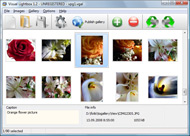



Overview

It's no secret that adding photos to your blog posts is one of the most effective ways to enhance your blog and attract attention to your writing. Flickr has millions of photos available in its database. A simple FREE tool called Flickr Gallery allows you to create a custom image gallery with a cool slide show of the most recent and most interesting photos from Flickr on your website or blog in a few easy steps. Just visit Flickr website and find photostream, photoset or a single photo you like. Enter the address of flickr page to add all photos from this page in your gallery, select the style of thumbnails and the overlay window and add the HTML embed code on your website or blog.
A few clicks and you'll see a stylish photo gallery with beautifull lightbox and zoom effects on your own website or blog!


Flickr Gallery for Windows   Flickr Gallery for MAC

Want more?

Example

Lightbox gallery sample

The following image set is generated by Flickr Gallery tool. Click any picture to run Lightbox gallery.

The example above is an in-page usage demo of Lightbox with images from Flickr. The lightbox gallery created with Flickr Gallery application is placed inside the page layout. You can also check the full-page demo website gallery. This example takes whole browser area to show the Lightbox gallery that uses images from Flickr.Lightbox Link To Flickr

How to Use

Step 1. Adding flickr images to your own gallery.


Locate the photo, photoset or photostream you want to use in your Flickr slideshow. Click on it to see the photo on its own page.

Copy URL of the flickr page.

Select Add images from Flickr... from the 'Add' button on the Toolbar.

Add images from Flickr

In the appeared window paste URL of the flickr page. Specify also the number of photos you want to add from the flickr page. Flickr Gallery will now include these photos in your project.

Add images from Flickr

If you have included the photos that you do not wish to be in your web gallery, you can easily remove them. Select all images that you wish to remove from photo gallery, and select Delete images. from the Images menu. You can pick and choose pictures by holding the CTRL while clicking the pictures you like.

Step 2. Adding caption.

The name of the photo on flickr page will automatically appear in the caption. When you select a photo you'll see the various info about it, such as: Path, Size, date of last change and Caption. You can add any comment or text about the photo (up to 512 symbols).

Step 3. Gallery properties.

Change the name of your flickr album, the size and quality of your pictures with Flickr Gallery. From the Gallery menu, select Properties or use "Edit Gallery Properties" button on the toolbar.

On the first tab of the Gallery Properties window you can change the name of your photo album and enable/disable the following properties: Slide Show, Auto play Slide Show, Zoom effect, Overlay Shadow. You can also set the Overlay shadow color and select the Engine you want to use (jQuery or Prototype + script.aculo.us).

On the second tab of the Gallery Properties window you can select the thumbnail you want to use, set the Thumbnails Resolution, Thumbnails Quality, Thumbnails Titles. Select Thumbnails Format (save in PNG or JPG format). Specify the Number of columns in you photo album and the Page color.

On the third tab of the Gallery Properties window you can select the template, Image resolution and Image quality of your pictures and change the Watermark.

You can set up the various sizes for exported images.

Control the quality of output PNG or JPEG format image by defining output "Image quality" and "Thumbnail quality" parameters (0%…100%).

Step 4. Save your photo gallery as project file.

When you exit Flickr Gallery application, you'll be asked if you want to save your project. The project consists of the pictures you choose to put on your web photo gallery and all your settings. It's a good idea to save the project, because that will allow you to change the project in case you decide to do something different with future galleries. So click Yes, then enter a name for your project. To select the location of your project, just click the Browse folders button and choose a different location. Then click Save.

Flickr Batch Download Large Images Flickr Background Color Settings

Download Flickr Gallery


Download Flickr Gallery Download Free Edition
for Windows
Download Flickr Gallery Download Free Edition
for MAC

Flickr Gallery is free for non-commercial use.

A small fee is required for business use. Flickr Gallery Business Edition additionally provides an option to remove the Flickr Gallery. Com credit bar as well as a feature to put your own logo to images. After you conclude the payment via the secure order form, you will receive a license key instantly by e-mail that turns the Flickr Gallery Free Edition into a Business one. You can select the most appropriate payment mode: bank transfer, check, credit card, PayPal etc. Also you can get Business Edition for free if you help with translating Flickr Gallery into your native language, please contact us at for more info.

Last Album Flickr On Joomla

Buy Flickr GalleryBuy Business Edition
for Windows

$49
Single Website
$69
Unlimited Websites
Buy Flickr GalleryBuy Business Edition
for MAC

$49
Single Website
$69
Unlimited Websites

Support

For general help, feature requests, troubleshooting contact Customer Support at . Make sure to include details on your Flickr Gallery version, operating system, browser and a link (or relevant code).Flickr Remove Photo Set

Feedback

    * I'd like to express my gratitude to your efforts on creating such a nice piece of program and best of all it's free! Keep out the good work and I hope to see new features in the near coming future to rate you 5 star!

    * This looks like EXACTLY what I need for my site. It would make my job much faster! Love your program. Thank you!!

    * First of all, I love you Flickr Gallery. I think it's beautiful! I purchased the lightbox “business edition” yesterday, and I’m very happy how easy it is to use. Found this to be one of the fastest ways to get a gallery on the web. Thanks.Thumb Widget Flickr

    * I just tried the application, It is wonderful idea. Like you said in the website "few clicks without writing a single line of code" because most of the people is not web designers".

FAQ

Q:Can this be adapted so only one image is shown and then the gallery opens to flick through the rest of the images..

A:You can use the following parameter to hide thumbnails you don't want to display on the page:

style="display: none;"

for example:

<!-- Start Flickr Gallery.com BODY section -->
<div id="vlightbox">
<a rel="lightbox_vlb" href="data/images/dscn6831.jpg" title="dscn6831" ><img src="data/thumbnails/dscn6831.png" ><span></span></a>
<a rel="lightbox_vlb" href="data/images/dscn6823.jpg" title="dscn6823"><img src="data/thumbnails/dscn6823.png" style="display: none"><span></span></a>
<a rel="lightbox_vlb" href="data/images/dscn6819.jpg" title="dscn6819"><img src="data/thumbnails/dscn6819.png" style="display:none"><span></span></a>
<a id="vlb" href="http://Flickr Gallery.com">Photo Gallery For Web by Flickr Gallery.com v2.0</a>
</div>
<!-- End Flickr Gallery.com BODY section -->


RELATED

Gradient color effects plugin for Photoshop ® PSP Single hi-impact color effects plugin - combines ring gradients, linear gradients, corner gradients, star gradients, burst and radial gradients, etc for frames, textures, overlays etc

Cooliris Developer Forum - Cooliris Wall background color I'm too looking forward to being able to set the background color (to white) For your convenience, here is a color wheel from which you can generate the hex code for the background color of your choosing - http://www.2createawebsite.com/build/color.swf

Is your (website's) underwear showing? – Jeffrey Zeldman But after all that, they'll forget to apply a background color to their site, and they won't think to check To see it in action, set your browser's default background color to magenta, or something equally piquant

Flickrslidr Background Color : Flickr Gallery Flickrslidr Background Color. Just upload files generated by the photo album builder to your server and it will run immediately, even if it's a free host without php, mysql, asp support!. Sample Flickr Html

Flickriver: Photos from Color Spot Flickriver - view images as a 'river of photos' and more etc, allowing to quickly open the corresponding Flickriver view. Also, allows quickly viewing any Flickr photo on black background in large size

GeekTonic: The Ultimate Flickr Tools Hacks and Scripts Database GM script - changes background color of flickr to black and the text to white. GM script - changes background color of flickr to black and the text to white. Flickr TopToolbar. GM script - insets toolbar

WordPress " SimpleFlickr " WordPress Plugins This attribute does not affect the background color of the HTML page. Overrides Background Color if set to 'transparent'. SimpleViewer Options. This plugin uses the SimpleViewer flash application for

Flex Background Colors Here's a Flex tip on changing default flex background colors: When you are using a different color background to the

Blogs That Flickr | Weblog: Blogs That Flickr -- Recoded! "color: #FFFFFF; text-decoration: none;">Blogs That Flickr

Scripts Tagged flickr – Userscripts.org Flickr - Background color. Changes background color on mouse hover. 5.0 4 reviews. 0. 18 for Flickr: this greasemonkey script removes the need to go from

If you set one color, set them all | 202: Accepted: Archives With CSS, you can change and control the color of various items on a page. However, if you start changing colors, you should specifically set all colors, less you be surprised by a change in the default colors of a user agent (ie, the default

Picture background? How do I change the background in a Simply authenticate that you agree that Picnik will directly connect to your Flickr account and you're done! You're also able to change the background color and size of your slide show through

Create a Transparent Glossy Lettering with The GIMP Hello Friends, In this tutorial you will learn how to create Cool and Glossy Transparent Lettering with The GIMP.This tutorial is inspired from settings.You wont notice much difference with the use of drop shadow but this will reduce the high effect of outer glow in any other background other

Water Color | Blogger Templates by Falcon Hive Just as its beautiful name, Water Color is a beautiful and outstanding template with its rare water color-based background design, and a Flickr gallery on

PhilRandolph.com - Blogging about Notes/Domino Development Unfortunately that was what I was trying to do, as the view I was trying to approximate was doing column background coloring to show the dashboard info. The closest thing I could come up with was to use the following construct at each cell that I wanted to set as a certain color

Valtik Wordpress Theme | Premium Wordpress Themes - AVJ Themes Vatik is an unique CMS template for wordpress, developed by NattyWP. Vatik is supplied with 6 additional widgets from NattyWP, and additional color module. You can change the background color and color design of one or few blocks from NattyWP

[onkala] explore. display. share | flickr + photos + videos [color settings] background color. photo/video border color. title color image] no background image. use the photo being viewed. background image transparency:

How to Change the AutoCAD Layout Background Color - Between I received a question on Twitter today asking how to change the AutoCAD 2011 background color of the Layout. The default color of the paper in a Layout is white, but perhaps you would like it to blue or maybe black

photofront - a better frontend for your photos Photofront offers the feel of a photography portfolio with the ease of your flickr account. Select a static color background or an adaptive background that automatically changes to match the overall color of each photo

Yahoo! Developer Network - Flash Developer Center - Articles The value of the background node is set as the background color of the Flash movie. We have a flash node, a single preference for background color and two action nodes that set the background color of the swf when it loads and when the user changes the

18 Incredible Ways to Create Digital Photo Collage | Binary Head For example, we have used keyword nature' in flickr search box and the URL generated was http://www. Once Collagr extracts images, you can play around with settings like the background color, Layout (Stitched or Border), spacing between pictures, the resolution of the

Big Spaceship | Labs Blog - Color Unity: Adobe vs. HTML Labs, a Big Spaceship blog, explores ideas, technology and experiments in digital design and development think coding, Flash, games and more. now, in either safari or firefox and placing pngs, gifs, or jpegs on a page with the background set to an html color code, it always matches

WP Flickr Background - Myatu's All you need to do is create one or more galleries within the plugin's settings, each containing a collection of photos from Flickr that you have chosen, and WP Flickr will randomly select a photo from the active gallery to display as the theme background

Jitbit Software Blog: March 2008 You set the background color and it picks some "relevant" photos from Flickr. network switcher tool, cause Vista requires administrative permissions to change network settings on the fly

No background color on Yahoo on Flickr - Photo Sharing! Here's a (very old) web design tip. Set your browser's background color to magenta or something equally painful. Now visit websites. You'll be surprised how many forget to set a background color

WP-SimpleViewer Wordpress Plugin Spectacular image galleries made simple. SimpleViewer is the home of the SimpleViewer family of image galleries - professional quality, fully customizable Flash image galleries. Download your free Flash image gallery here. To set the gallery background color, width or height, edit the

