
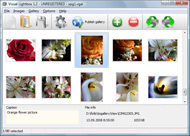



Overview

It's no secret that adding photos to your blog posts is one of the most effective ways to enhance your blog and attract attention to your writing. Flickr has millions of photos available in its database. A simple FREE tool called Flickr Gallery allows you to create a custom image gallery with a cool slide show of the most recent and most interesting photos from Flickr on your website or blog in a few easy steps. Just visit Flickr website and find photostream, photoset or a single photo you like. Enter the address of flickr page to add all photos from this page in your gallery, select the style of thumbnails and the overlay window and add the HTML embed code on your website or blog.
A few clicks and you'll see a stylish photo gallery with beautifull lightbox and zoom effects on your own website or blog!


Flickr Gallery for Windows   Flickr Gallery for MAC

Want more?

Example

Lightbox gallery sample

The following image set is generated by Flickr Gallery tool. Click any picture to run Lightbox gallery.

The example above is an in-page usage demo of Lightbox gallery that uses images from Flickr. The website gallery created with Flickr Gallery application is placed inside the html page. You can also check the full-page demo gallery. This example takes whole browser area to show the web gallery.How To Embed Flickr Into Website

How to Use

Step 1. Adding flickr images to your own gallery.


Locate the photo, photoset or photostream you want to use in your Flickr slideshow. Click on it to see the photo on its own page.

Copy URL of the flickr page.

Select Add images from Flickr... from the 'Add' button on the Toolbar.

Add images from Flickr

In the appeared window paste URL of the flickr page. Specify also the number of photos you want to add from the flickr page. Flickr Gallery will now include these photos in your project.

Add images from Flickr

If you have included the photos that you do not wish to be in your web gallery, you can easily remove them. Select all images that you wish to remove from photo gallery, and select Delete images. from the Images menu. You can pick and choose pictures by holding the CTRL while clicking the pictures you like.

Step 2. Adding caption.

The name of the photo on flickr page will automatically appear in the caption. When you select a photo you'll see the various info about it, such as: Path, Size, date of last change and Caption. You can add any comment or text about the photo (up to 512 symbols).

Step 3. Gallery properties.

Change the name of your flickr album, the size and quality of your pictures with Flickr Gallery. From the Gallery menu, select Properties or use "Edit Gallery Properties" button on the toolbar.

On the first tab of the Gallery Properties window you can change the name of your photo album and enable/disable the following properties: Slide Show, Auto play Slide Show, Zoom effect, Overlay Shadow. You can also set the Overlay shadow color and select the Engine you want to use (jQuery or Prototype + script.aculo.us).

On the second tab of the Gallery Properties window you can select the thumbnail you want to use, set the Thumbnails Resolution, Thumbnails Quality, Thumbnails Titles. Select Thumbnails Format (save in PNG or JPG format). Specify the Number of columns in you photo album and the Page color.

On the third tab of the Gallery Properties window you can select the template, Image resolution and Image quality of your pictures and change the Watermark.

You can set up the various sizes for exported images.

Control the quality of output PNG or JPEG format image by defining output "Image quality" and "Thumbnail quality" parameters (0%…100%).

Step 4. Save your photo gallery as project file.

When you exit Flickr Gallery application, you'll be asked if you want to save your project. The project consists of the pictures you choose to put on your web photo gallery and all your settings. It's a good idea to save the project, because that will allow you to change the project in case you decide to do something different with future galleries. So click Yes, then enter a name for your project. To select the location of your project, just click the Browse folders button and choose a different location. Then click Save.

Customizing Flickr Slideshow Speed Param Get Flickr User Id

Download Flickr Gallery


Download Flickr Gallery Download Free Edition
for Windows
Download Flickr Gallery Download Free Edition
for MAC

Flickr Gallery is free for non-commercial use.

A small fee is required for business use. Flickr Gallery Business Edition additionally provides an option to remove the Flickr Gallery. Com credit bar as well as a feature to put your own logo to images. After you complete the payment via the secure form, you will receive a license key instantly by e-mail that turns the Flickr Gallery Free Edition into a Business one. You can select the most appropriate payment procedure: bank transfer, PayPal, check, credit card etc. Also you can get Business Edition for free if you help with translating Flickr Gallery into your native language, please contact us at for more info.

Flickr For Blog

Buy Flickr GalleryBuy Business Edition
for Windows

$49
Single Website
$69
Unlimited Websites
Buy Flickr GalleryBuy Business Edition
for MAC

$49
Single Website
$69
Unlimited Websites

Support

For feature requests, troubleshooting, general help contact Customer Support at . Make sure to include details on your Flickr Gallery version, a link (or relevant code), operating system and a browser.Display Flickr Photo Stream As3

Feedback

    * I would like to say that Flickr Gallery is a stunning lil program! Its almost too good to be true i'd say! I've been looking for tutorials to create a lightbox gallery, but just couldnt come right. Im so glad i found Flickr Gallery!

    * Just bought the business version of Flickr Gallery and I just had to write and say how impressed I am with it. Really easy to use, intuitive interface and generates a truly professional presentation. Seldom have I been so pleased with a software purchase. Thank you.

    * I'd like to express my gratitude to your efforts on creating such a nice piece of program and best of all it's free! Keep out the good work and I hope to see new features in the near coming future to rate you 5 star!Flickr Gallery Larger Thumbnails

    * First of all, I love you Flickr Gallery. I think it's beautiful! I purchased the lightbox “business edition” yesterday, and I’m very happy how easy it is to use. Found this to be one of the fastest ways to get a gallery on the web. Thanks.

FAQ

Q:Can this be adapted so only one image is shown and then the gallery opens to flick through the rest of the images..

A:You can use the following parameter to hide thumbnails you don't want to display on the page:

style="display: none;"

for example:

<!-- Start Flickr Gallery.com BODY section -->
<div id="vlightbox">
<a rel="lightbox_vlb" href="data/images/dscn6831.jpg" title="dscn6831" ><img src="data/thumbnails/dscn6831.png" ><span></span></a>
<a rel="lightbox_vlb" href="data/images/dscn6823.jpg" title="dscn6823"><img src="data/thumbnails/dscn6823.png" style="display: none"><span></span></a>
<a rel="lightbox_vlb" href="data/images/dscn6819.jpg" title="dscn6819"><img src="data/thumbnails/dscn6819.png" style="display:none"><span></span></a>
<a id="vlb" href="http://Flickr Gallery.com">Photo Gallery For Web by Flickr Gallery.com v2.0</a>
</div>
<!-- End Flickr Gallery.com BODY section -->


RELATED

Wait till I come! " flickr.whois – using YQL to find Flickr flickr.whois – using YQL to find Flickr user data from user ID or user name This returns a single photo and I can use its ID to get to the rest of my user data by reading out the owner (try this in the console)

Here is the PHP5 SOURCE A simple script to get the urls of flickr photos given a username // It uses the flickr API to first obtain the flickr user_id, then again to // get all the photos and info from this user // This could be extended easily to actually download your photos to your server, or desktop

What Is My Flickr ID :: adam lewis What's my Flickr ID (NSID)? If you've ever asked yourself that question, this article is for you! Or, if you don't know your username or your email address, you can look up your user id (and username) by entering your Flickr URL

Flickr

Find your Flickr ID A simple utility for finding your Flickr user id number

XML.com: Scripting Flickr with Python and REST Listing 1: Interactive session using FlickrClient to get a list of favorite photo titles > flickrlib.FlickrAgent(FLICKR_API_KEY, FLICKR_API_SSECRET) >>> #Find the user ID of the person named "uche" >>> person = client

idGettr — Find your Flickr ID A simple utility for finding your Flickr user id number (also works for groups)

Born On The Web " Blog Archive " REST web service: a flickr You can enter a username in a form, we're going to look for the user his id number and display his recent photos. We'll be using 2 flickr methods: findByUsername: before we can get the users photos we need to have the user id number. That's why we're using this method

How to Use the Flickr API Flickr is a very well developed web application that allows you to store and share your photos. The site has an easy to use API that will allow you You can easily access your user id as well as lots of other useful information if you are on the flickr.people.GetPublicPhotos API page (or any other

Flickr Users Are Mad as Hell About Today's Yahoo News I didn't get the exact user ID, instead of superstewy I made Flickr remembers my user ID, so I never have to write it, and your user ID in actual

TiltViewer Flickr Gallery Set your Flickr user id and optional tag names in the HTML document that contains TiltViewer. View an example Flickr gallery here. Note: Due to Flash Player security restrictions, Flickr galleries will only work when uploaded to a web server. For more details, check the FAQ, Question 2

WordPress

Building a Flickr Flash Display, Part 1 To get photos, you have to provide an API key from www.flickr.com and a user id for the images, you want to show. The API key is the one for the new application and the user NSID is for my Flickr user Petit

Flickr and Perl LG #110 The first step is to get an API key. Flickr is still a relatively new service, and want to know who is writing software to access I'm only really interested in using my own photos, so I first need to get my user id

Flickr-ing about with .NET - Coding4Fun - Site Home - MSDN Blogs This user ID can then be used to search that user's photos, favorites, groups, contacts, and so on. use that same Frob to get the Authentication Token as well as the User ID of the authenticated user (see, told you we'd get back

plugins:flickr - Geeklog France The plugin will get the photo's title from Flickr and display it as a parameter allow you to specify a set ID for this user. A set ID : 72157603679761232

The World's Best Photos by iw - Flickr Hive Mind iw ( User ) Flickr Hive Mind miele id vegetables industrialdesign cultivatesystem selfsufficiency cultivate sustainability foodmiles plants Pairs: foodmiles,industrialdesign id,kitchensofthefuture cultivate, If you are a Flickr user and Log into Flickr you will be able to see your private photos,

One random photo from your flickr-stream — blog.kno.at It will check if there's a user id specified (the ugly flickr user-id string, that is, due the badges don't seem to work with the usernames) That way there are four possibilities to get a valid result: specify a user and rely on the default url. specify a full badge-url

Flickr Photobar Gallery | Codrops After we got a lot of great feedback for our image galleries we decided to follow some of the suggestions and create a gallery that uses the Flickr API. The aim was to build a bottom photobar that one can easily integrate into a website. It is

FlickrIntegration - Django - Trac You can modify the synchronization method to allow two-way synchronization or more robust synchronization that doesn't stop when it hits the first flickr photo that already exists in your database. Before we start, you'll need the following flickr information: API key. Your user id

Flickr blocks not showing | drupal.org I have tried Many times, with a couple of different keys, and get the same results. When I first fill out "admin/settings/flickr", the "Default Flickr User Id:" is uneditable. I fill in the API key and Shared secret, via copy and past, verify, and then save

valibuk.net " Access Flickr with Ruby and Flickraw To work with user specific photos (and our own are) we need the user id. id = flickr.people.findByUsername(:username => "YOUR USER SCREEN NAME").id. Go to the idGettr page, paste your Flickr user profile URL and the page will show your Flickr user id (e.g

Flickr - YDN Get started using Flickr photo-community web services Get an Application ID. To make Flickr web service calls, you must get an application key. There are no set restrictions on the number of calls your application can make

Archives § The Adventures of Cindy Li Basically IE8 doesn't render the bold text when new content is added to flickr so it doesn't show the user that anything has changed. To get around this i got a bit of It looks like a lot bit really it's a copy and paste (just remember to change the feed for your flickr ID

Customize Thesis: Add Flickr Sidebar Photos This tutorial is for those lucky users who run their sites on WordPress using the Chris Pearson's Thesis theme. If you haven't The flickr photos should be displaying in the sidebar, don't forget to change the code within the 2nd hook to your user id. If you need help finding your user id, check

flickrVIEWR – A flickr viewer in Silverlight – Part 1 NSID is a user id in flickr. It is basically just a string. So to private string ApiKey { get; set; } private string NSID { get; set; } My service will as I said over and over make calls to flickr. These calls are made using a preset format. Due to this I created a couple of helper properties

www.apifinder.com - Get Started with API Programming Using get a list of the photos uploaded by a user. get information about photos, users, groups, blogs (Flickr has a This function is quite simple—it returns the link to a user id's photos; in my case the URL is www.flickr.com/photos/zzkj

Beyond Friendship Graphs: A Study of User Interactions in Flickr Bob, time. Alice photo id. User Interactions in Flickr. Users interactions/relations are of 10 queries/second. Has well-known user ID format (e.g., 12345678@No2) Data collection

