


Overview

It's no secret that adding photos to your blog posts is one of the most effective ways to enhance your blog and attract attention to your writing. Flickr has millions of photos available in its database. A simple FREE tool called Flickr Gallery allows you to create a custom image gallery with a cool slide show of the most recent and most interesting photos from Flickr on your website or blog in a few easy steps. Just visit Flickr website and find photostream, photoset or a single photo you like. Enter the address of flickr page to add all photos from this page in your gallery, select the style of thumbnails and the overlay window and add the HTML embed code on your website or blog.
A few clicks and you'll see a stylish photo gallery with beautifull lightbox and zoom effects on your own website or blog!


Flickr Gallery for Windows   Flickr Gallery for MAC

Want more?

Example

Lightbox gallery sample

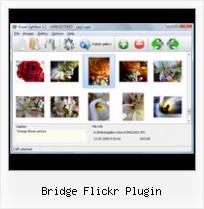
The following image set is generated by Flickr Gallery tool. Click any picture to run Lightbox gallery.

The example above is an in-page usage demo of Lightbox gallery that uses images from Flickr. The website gallery created with Flickr Gallery software is placed inside the html page. You can also check the full-page demo website gallery. This example takes whole browser area to show the website gallery.Com Kelvinluck Flickr Flickr Download

How to Use

Step 1. Adding flickr images to your own gallery.


Locate the photo, photoset or photostream you want to use in your Flickr slideshow. Click on it to see the photo on its own page.

Copy URL of the flickr page.

Select Add images from Flickr... from the 'Add' button on the Toolbar.

Add images from Flickr

In the appeared window paste URL of the flickr page. Specify also the number of photos you want to add from the flickr page. Flickr Gallery will now include these photos in your project.

Add images from Flickr

If you have included the photos that you do not wish to be in your web gallery, you can easily remove them. Select all images that you wish to remove from photo gallery, and select Delete images. from the Images menu. You can pick and choose pictures by holding the CTRL while clicking the pictures you like.

Step 2. Adding caption.

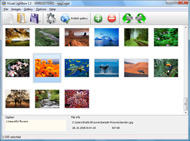
The name of the photo on flickr page will automatically appear in the caption. When you select a photo you'll see the various info about it, such as: Path, Size, date of last change and Caption. You can add any comment or text about the photo (up to 512 symbols).

Step 3. Gallery properties.

Change the name of your flickr album, the size and quality of your pictures with Flickr Gallery. From the Gallery menu, select Properties or use "Edit Gallery Properties" button on the toolbar.

On the first tab of the Gallery Properties window you can change the name of your photo album and enable/disable the following properties: Slide Show, Auto play Slide Show, Zoom effect, Overlay Shadow. You can also set the Overlay shadow color and select the Engine you want to use (jQuery or Prototype + script.aculo.us).

On the second tab of the Gallery Properties window you can select the thumbnail you want to use, set the Thumbnails Resolution, Thumbnails Quality, Thumbnails Titles. Select Thumbnails Format (save in PNG or JPG format). Specify the Number of columns in you photo album and the Page color.

On the third tab of the Gallery Properties window you can select the template, Image resolution and Image quality of your pictures and change the Watermark.

You can set up the various sizes for exported images.

Control the quality of output PNG or JPEG format image by defining output "Image quality" and "Thumbnail quality" parameters (0%…100%).

Step 4. Save your photo gallery as project file.

When you exit Flickr Gallery application, you'll be asked if you want to save your project. The project consists of the pictures you choose to put on your web photo gallery and all your settings. It's a good idea to save the project, because that will allow you to change the project in case you decide to do something different with future galleries. So click Yes, then enter a name for your project. To select the location of your project, just click the Browse folders button and choose a different location. Then click Save.

Horizontal Slideshow For Flickr Bridge Flickr Plugin

Download Flickr Gallery


Download Flickr Gallery Download Free Edition
for Windows
Download Flickr Gallery Download Free Edition
for MAC

Flickr Gallery is free for non-commercial use.

A small fee is required for business use. Flickr Gallery Business Edition additionally provides an option to remove the Flickr Gallery. Com credit string as well as a feature to put your own logo to images. After you complete the payment via the secure order form, you will receive a license key instantly by e-mail that turns the Flickr Gallery Free Edition into a Business one. You can select the most appropriate payment method: bank transfer, credit card, check, PayPal etc. Also you can get Business Edition for free if you help with translating Flickr Gallery into your native language, please contact us at for more info.

Autoviewer Flickr

Buy Flickr GalleryBuy Business Edition
for Windows

$49
Single Website
$69
Unlimited Websites
Buy Flickr GalleryBuy Business Edition
for MAC

$49
Single Website
$69
Unlimited Websites

Support

For feature requests, troubleshooting, general help contact Customer Support at . Make sure to include details on your operating system, browser, a link (or relevant code) and Flickr Gallery version.Flickr Sync Tool Mac

Feedback

    * I find Flickr Gallery (and lightbox2) a great tool and was about to proceed in its purchase.

    * I LOVE your free Lightbox2 software tool and will purchase the business version shortly. I have seen the Lightbox JS effect used with video tutorials and I was hoping you have a version for video that I can purchase.
Video LightBox: http://videolightbox.com

    * I would like to say that Flickr Gallery is a stunning lil program! Its almost too good to be true i'd say! I've been looking for tutorials to create a lightbox gallery, but just couldnt come right. Im so glad i found Flickr Gallery!Flickr Pro Account For Discounts

    * First of all, your product is fantasitc. I looked at the others and your code generator app was insanely easy to use.

FAQ

Q:How do I embed the lightbox image gallery into an existing page?

A:To install Flickr Gallery gallery on your page you should:

1. Create your gallery in Flickr Gallery and publish it on a local drive in any test folder.
2. Open index.html file from the saved folder in any text editor.
3. Copy code for the HEAD section and paste it inside the HEAD section of you own webpage, for example:

<head>
...
<!-- Start Flickr Gallery.com HEAD section -->
<link rel="stylesheet" href="engine/css/vlightbox.css" type="text/css" />
<style>#vlightbox a#vlb{display:none}</style>
<link rel="stylesheet" href="engine/css/Flickr Gallery.css" type="text/css" media="screen" />
<script src="engine/js/jquery.js" type="text/javascript"></script>
<script src="engine/js/jquery.tools.min.js" type="text/javascript"></script>
<script src="engine/js/visuallightbox.js" type="text/javascript"></script>
<!-- End Flickr Gallery.com HEAD section -->

...
</head>


4. Copy code for the BODY section and paste it inside the Body section of you own webpage in the place where you want to have a gallery, for example:

<body>
...
<!-- Start Flickr Gallery.com BODY section -->
<div id="vlightbox">
<a rel="lightbox_vlb" href="data/images/dscn6831.jpg" title="DSCN6831"><img src="data/thumbnails/dscn6831.png"><span></span></a>
<a rel="lightbox_vlb" href="data/images/dscn6823.jpg" title="DSCN6823"><img src="data/thumbnails/dscn6823.png"><span></span></a>
<a rel="lightbox_vlb" href="data/images/dscn6819.jpg" title="DSCN6819"><img src="data/thumbnails/dscn6819.png"><span></span></a>
<a id="vlb" href="http://Flickr Gallery.com">Photo Gallery For Web by Flickr Gallery.com v2.1</a>
</div>
<!-- End Flickr Gallery.com BODY section -->

...
</body>


5. Copy 'data' folder with images and thumbnails and 'engine' folder with .css and .js files into the same folder with your own webpage.
You can find the example on our website:
http://www.Flickr Gallery.com/#example


RELATED

Finally, OBX To Get A Mid-Currituck Bridge! | Trevor Dickerson Finally, after years and years of talk and no real solid plans, it looks as if the Outer Banks is finally going to get the long-debated Mid-Currituck Bridge! If Permission denied in /var/www/trevordickerson.com/htdocs/wp-content/plugins/slickr-gallery/slickr/lib.flickr.php on line 501

Flickriver: andrew mace—'s photos tagged with bridge Flickriver - view images as a 'river of photos' and more Install search plugin "View on Flickriver" Greasemonkey script. A Greasemonkey script that adds Flickriver links to various Flickr photo pages - user photos, favorites, pools etc, allowing to quickly open the corresponding

Major Photoshop Upgrade Is Overkill for the Flickr Crowd However, Bridge does have a revamped plug-in architecture that will allow outside developers to build tools to leverage online services -- much like the Flickr plug-in for Apple's Aperture. I can process my images and upload directly to the web with the Flickr export plug-in

AIR plug-in based application - InsideRIA Introduction Create an AIR application based on the loading of external HTML/JS modules that use the sand box bridge in order to communicate with the main application and in order to not lose the AIR’s api capabilities. This article will

How to Publish Images from Lightroom to Flickr There are, however, tools like Jeffrey Friedl's Lightroom plug-in that you can use to do the job. This opens the Plug-in Manager dialog where you install your Lightroom plug-ins

Highway 79 Bridge Complete Highway 79 Bridge Complete. by Jason Koertge on October 4, 2008 · 2 comments. Warning: file_put_contents(/usr/www/users/waltonch/pcbdaily.com/wp-content/plugins/flickr-tag/cache/501037a942f527a896d7947e677408be.cache) [function.file-put-contents]

Flickr Blog This to Draft Plugin: Flickr Draft Post Purpose: Instead of publishing, Flickr's Blog This function will make a draft post to your blog

Stefan Bäurle (StefanBa) on Twitter Granuja Falls: http://www.flickr.com/photo 9:04 PM Aug 29th from Jeffrey's Export-to-Flickr Plugin for Lightroom Train Bridge over Soquel Creek in Capitola, A at Night: http://www.flickr.com/photo 7:32 AM Aug 23rd from Jeffrey's Export-to-Flickr Plugin for

Flickr vs. SmugMug – a comparison of the picture services As every other web developer on Earth, I initially clung on to Flickr for my photos, but recently I did a little evaluation round, and instead fell for SmugMug

Flickr Mac Goodness Laurie was kind enough to hook me up with a Flickr account a while back (Thanks, Laurie! I thought I'd point to a very useful iPhoto plug-in that makes posting to Flickr a snap

Map Flickr photos with Google Earth I'm very happy to hear about the first Google Earth add-on from Dan at Geobloggers, who writes in with a new service which displays the 50 closest Flickr photos near a place you're viewing using Google Earth

Interactive Online - Slickr Flickr WordPress Gallery Plugin When it comes to image gallery plugins, there are tons of options available. In this article we will be sharing with you a plugin that displays your Flickr photos into WordPress posts, pages, and/or

Under Matt Goff Bridge on Flickr - Photo Sharing! An Irish Rail InterCity services passing under the new Matt Goff Bridge in Leixlip on a dull winter afternoon. The water in the foreground is the Royal Canal. This bridge was built recently to allow heavy goods traffic to and from Intel Ireland

Widgetbox " Flickr: Brooklyn Bridge Widget Get the Flickr: Brooklyn Bridge widget on Widgetbox.com! I've got lots of cool places to go listed on my website, but I

5th Bridge | Volunteerism ... A Way of Life Powered by the Flickr Photo Album plugin for WordPress. Square • Northfield, MN 55057 • Contact Us © 2010 5th Bridge. All Rights Reserved. Admin

Bridge Flickr Plugin : Flickr Gallery Bridge Flickr Plugin. Build professional web photo gallery templates in minutes with Flickr Gallery!. Drupal Mod Photo

Download the Photo Dropper Flickr Wordpress Plugin Photo Dropper is a Wordpress plugin that lets you add Flickr photos to your posts. you would like for your post (Example: "sunset", "black cat", or "HDR bridge") and click the Search button

pflickr v1.1 After using the pflickr widget v1.0 for a while, I notice that my blog does not load fast enough and I decided to implement some caching. The Wordpress Plugin Directory has a list of plugins for the blogger to use and take advantage of flickr; SimpleFlickr, Flickr Tag Cloud Widget,

Lightroom Export Plugin for Flickr - Inside Lightroom Ever since Lightroom 1.3 was released with support for export plugins, I've been looking forward to being able to export directly to Flickr from inside Lightroom. Today, while searching around on the net, I found that fellow O'Reilly author

Google Maps

The Purple Of Twilight; Rainbow Bridge, Tokyo, Japan On Singapore Job Vacancies the purple of twilight; rainbow bridge, tokyo, japan on flickr - photo

Jeffrey Friedl's Blog " Jeffrey's Lightroom Goodies (Plugins I have LR 2.0 and love your flickr plugin. Problem is it takes FOREVER to export photos. How do I make the plugin upload the original photo to Flickr without making any changes to it, besides having the keywords go with it?

WordPress Station Seven Nine has released the first public beta of their F Gallery plugin, which allows for the display of your Flickr images on your site. It appears this is the first plugin that allows for albums and not just the most recent images, will be

Flickr and iPhoto: Hand in Hand | Photography | Mac Gems A plugin lets you publish your iPhoto images to the Flickr photo-sharing site

