



Overview

It's no secret that adding photos to your blog posts is one of the most effective ways to enhance your blog and attract attention to your writing. Flickr has millions of photos available in its database. A simple FREE tool called Flickr Gallery allows you to create a custom image gallery with a cool slide show of the most recent and most interesting photos from Flickr on your website or blog in a few easy steps. Just visit Flickr website and find photostream, photoset or a single photo you like. Enter the address of flickr page to add all photos from this page in your gallery, select the style of thumbnails and the overlay window and add the HTML embed code on your website or blog.
A few clicks and you'll see a stylish photo gallery with beautifull lightbox and zoom effects on your own website or blog!


Flickr Gallery for Windows   Flickr Gallery for MAC

Want more?

Example

Lightbox gallery sample

The following image set is generated by Flickr Gallery tool. Click any picture to run Lightbox gallery.

The photo gallery above is an in-page usage demo of Lightbox with images from Flickr. The slideshow created with Flickr Gallery software is placed inside the page layout. You can also check the full-page demo lightbox gallery. This example takes whole browser area to show the Lightbox gallery that uses images from Flickr.Free Flickr Photostream Viewer

How to Use

Step 1. Adding flickr images to your own gallery.


Locate the photo, photoset or photostream you want to use in your Flickr slideshow. Click on it to see the photo on its own page.

Copy URL of the flickr page.

Select Add images from Flickr... from the 'Add' button on the Toolbar.

Add images from Flickr

In the appeared window paste URL of the flickr page. Specify also the number of photos you want to add from the flickr page. Flickr Gallery will now include these photos in your project.

Add images from Flickr

If you have included the photos that you do not wish to be in your web gallery, you can easily remove them. Select all images that you wish to remove from photo gallery, and select Delete images. from the Images menu. You can pick and choose pictures by holding the CTRL while clicking the pictures you like.

Step 2. Adding caption.

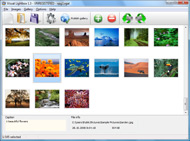
The name of the photo on flickr page will automatically appear in the caption. When you select a photo you'll see the various info about it, such as: Path, Size, date of last change and Caption. You can add any comment or text about the photo (up to 512 symbols).

Step 3. Gallery properties.

Change the name of your flickr album, the size and quality of your pictures with Flickr Gallery. From the Gallery menu, select Properties or use "Edit Gallery Properties" button on the toolbar.

On the first tab of the Gallery Properties window you can change the name of your photo album and enable/disable the following properties: Slide Show, Auto play Slide Show, Zoom effect, Overlay Shadow. You can also set the Overlay shadow color and select the Engine you want to use (jQuery or Prototype + script.aculo.us).

On the second tab of the Gallery Properties window you can select the thumbnail you want to use, set the Thumbnails Resolution, Thumbnails Quality, Thumbnails Titles. Select Thumbnails Format (save in PNG or JPG format). Specify the Number of columns in you photo album and the Page color.

On the third tab of the Gallery Properties window you can select the template, Image resolution and Image quality of your pictures and change the Watermark.

You can set up the various sizes for exported images.

Control the quality of output PNG or JPEG format image by defining output "Image quality" and "Thumbnail quality" parameters (0%…100%).

Step 4. Save your photo gallery as project file.

When you exit Flickr Gallery application, you'll be asked if you want to save your project. The project consists of the pictures you choose to put on your web photo gallery and all your settings. It's a good idea to save the project, because that will allow you to change the project in case you decide to do something different with future galleries. So click Yes, then enter a name for your project. To select the location of your project, just click the Browse folders button and choose a different location. Then click Save.

Flickr Joomla Sets Module Groups Flickr Codes

Download Flickr Gallery


Download Flickr Gallery Download Free Edition
for Windows
Download Flickr Gallery Download Free Edition
for MAC

Flickr Gallery is free for non-commercial use.

A small fee is required for business use. Flickr Gallery Business Edition additionally provides an option to remove the Flickr Gallery. Com credit bar as well as a feature to put your own logo to images. After you finish the payment via the secure form, you will receive a license key instantly by e-mail that turns the Flickr Gallery Free Edition into a Business one. You can select the most appropriate payment method: bank transfer, check, PayPal, credit card etc. Also you can get Business Edition for free if you help with translating Flickr Gallery into your native language, please contact us at for more info.

Html Use Flickr Api Gallery

Buy Flickr GalleryBuy Business Edition
for Windows

$49
Single Website
$69
Unlimited Websites
Buy Flickr GalleryBuy Business Edition
for MAC

$49
Single Website
$69
Unlimited Websites

Support

For feature requests, troubleshooting, general help contact Customer Support at . Make sure to include details on your Flickr Gallery version, browser, a link (or relevant code) and operating system.Picasa Flickr Integration Joomla Module

Feedback

    * I am thrilled with what this tool can do for me thanks for all the hard work that must have gone into it.

    * I have just bought this product and think it is great. As it is extremely easy to use it is something I could get my clients to purchase to upload their own portfolio and latest projects etc.

    * Just a quick thank you for the software though, It's not often you get a free software version of this quality and style! Well done and please continue this amazing gallery. Hope to see more advances.Flickr Gallery For Website

    * I downloaded your trial version to see if I could get it to work with my website, and I am almost there (I have been looking for something like this for ages)..

FAQ

Q:Instead of making one page with 40 photos, is there no property to make 2 or more pages?

A:You can do it in the following way:

1. Create your gallery in Flickr Gallery and publish it on a local drive in any test folder.
2. Make two copies of the generated index.html file (for example index1.html and index2.html).
3. Open index.html, index1.html and index2.html files in any text editor.
4. Find code for the gallery inside the BODY tag and cut some part of the images, so you'll have different images on each page.

<!-- Start Flickr Gallery.com BODY section -->
<div class="gallery">
<!-- leave the following code on index.html page -->
<a href="./data/images/1.jpg" rel="lightbox[sample]" title="Best Toy Ever"><img src="./data/thumbnails/1.png" /></a>
<a href="./data/images/8.jpg" rel="lightbox[sample]" title="PrueaMacro"><img src="./data/thumbnails/8.png" /></a>

<!-- leave the following code on index1.html page -->
<a href="./data/images/3.jpg" rel="lightbox[sample]" title="Macro Leaf."><img src="./data/thumbnails/3.png" /></a>
<a href="./data/images/11.jpg" rel="lightbox[sample]" title="Bell Pepper"><img src="./data/thumbnails/11.png" /></a>

<!-- leave the following code on index2.html page -->
<a href="./data/images/5_0.jpg" rel="lightbox[sample]" title="5"><img src="./data/thumbnails/5_0.png" /></a>
<a href="./data/images/6_0.jpg" rel="lightbox[sample]" title="6"><img src="./data/thumbnails/6_0.png" /></a>

<!--[if lte IE 6]><script src="engine/js/pngfix_vlb.js" type="text/javascript"></script><![endif]-->
<a id="vlightbox" href="http://Flickr Gallery.com/">Online Photo Album Sharing by Flickr Gallery.com</a>
</div>
<!-- End Flickr Gallery.com BODY section -->

5. Create links to switch between your pages, for example:
<a href="index.html">1</a>  <a href="index1.html">2</a>  <a href="index2.html">3</a> 


Q:I want to change color of the overlay shadow? How can I do this?

A:Open engine\css\Flickr Gallery.css and find the following code:

#overlay{
position: absolute;
top: 0;
left: 0;
z-index: 90;
width: 100%;
height: 500px;
background-color: #FFF;
filter:alpha(opacity=60);
-moz-opacity: 0.6;
opacity: 0.6;
}

set the background-color parameter :

#overlay{
position: absolute;
top: 0;
left: 0;
z-index: 90;
width: 100%;
height: 500px;
background-color: #FF00FF;
filter:alpha(opacity=60);
-moz-opacity: 0.6;
opacity: 0.6;
}


RELATED

Flickr Code launched | Glen Scott - Keeping it simple Flickr Code is a one-stop shop for information, gossip and discussion with the Flickr developer community. Includes the open source code for the new Flickr

Ilyokwan Black Belt Academy Beta Site Test This tool is designed to let you embed Flickr images into posts on Bulletin Boards that do not support HTML posting, whilst still complying with Flickr's terms that any posted image should link back to flickr. code from the first box. Paste it into the box below, then click the

Flickrfox - the best way to explore flickr It makes managing groups, searching tags, and keeping up with your contacts easy, and it's a fun way to explore flickr. "Why does this site appear in my Flickr stats?" When one of your contacts or Flickr friends is using Flickrfox, and they click

Flickr Code: Track Tickets, Talk APIs, Hack As You Please Flickr's been getting some headlines these past few weeks, mostly due to the vocal outcry resulting from the backlash against video on Flickr. The company Dubbed code.flickr,' the site is being labeled a "one-stop shop for information, gossip, and discussion with the Flickr developer community

Make your own Flickr search engine with Flash and in this tutorial I'm gonna show you how to interact with the flickr data base, making your own photo search engine, looking for tags on the photos. Now we could add some code in our search frame, so we could connect with the Flickr data base, but first we have to know how call that pics:

How To Add Flickr To Wordpress In 5 Simple Steps | A In today's tutorial, I will be showing you how to add your Flickr Photostream to your Wordpress blog using jSon and jQuery. I learned how to do this trick a few

Flickr Code Causing Scroll Bars :: Forum :: Indexhibit This isn't a problem with anthing particulary to do with Indexhibit, but more an issue with how the code that Flickr allows you to blog is causing scroll bars on my blog, which is inside an iFrame on my blog page. So I'm fixed all scroll bars issues by adding this piece of code to my iFrame

Flickr " Code 9 design media marketing Blog Posts Tagged Flickr' Adam's favourite Bristol pic's added to Flickr. Monday, September 7th, 2009. Take a look at some of my favourite pictures taken around Bristol over the last 5 years. You can find them in the Code 9 photostream on Flickr. Code 9 Photostream

Blogs That Flickr | Weblog: THIS IS THE FLICKR CODE v.1 THIS IS THE FLICKR CODE v.1. I found this in flickr central: It is just a fun 'insider' way to let other Flickr'ers know how bad you have Flickritis! I'm sure there are more things a person could add, and if more come up enough they can be added to future versions

Wackylabs.Net : Flickr.Net Example Code See the general Flickr.Net API page for the latest at any time. Posted by Sam on Tuesday, September 13, 2005, at 5:13 pm, and filed under Code, Flickr. Follow any responses to this post with its comments RSS feed. Comments are closed, but you can trackback from your blog. { 11 } Comments

flickr - Google Code This project is an implementation of the Flickr API in Tcl. You can read a quick Introduction or directly dig into the QuickStartGuide which will help you writing code at once. This project was developed as part of a SICS research project within the ICE laboratory

Flickr API Profile Flickr API -- see mashups, code, news, reviews and resources. Plus hundreds of APIs and mashups. The Flickr API can be used to retrieve photos from the Flickr photo sharing service using a variety of feeds - public photos and videos, favorites, friends, group pools, discussions, and more

Code Flickr " memoirs on a rainy day Published April 17, 2008 asides , programming , technology Leave a Comment. Tags: API, asides, flickr, Flickr Code, Open Source, Photomatt, programming, wordpress. Flickr is publishing some of their API codes (including the flash uploader) on their new code.flickr blog. ( via photomatt)

Flickr Code That said, I'm not sure I ever expected to see one of my code.flickr blog posts re-interpreted in Belorussian until this weekend when I was contacted by a translator by the name of Patricia Clausnitzer. Patricia has provided [ ] Read on. A lil' time with

Flickr Code Flickr, Yahoo's photo sharing service, has rolled out a new website dedicated to Flickr's popular API tools. The new site, Code.Flickr, offers developers a place to review API information, discuss tools in the forums and of course rant about the

Code Beach: flickr Code Beach is your ultimate programming guide to flickr

Flickr QR Codes Home QR Code Resources + Flickr QR Codes. Flickr QR Codes. This option will not work correctly. Unfortunately, your browser does not support inline frames. Share the love .. Connect with Facebook. I'm sorry to login using myApi, the Facebook Connect bridge for Joomla you need Javascript enabled

The lost outpost: Flickr Code Flickr. www.flickr.com. Other writings. Article: Dynamically update a Web service interface Change Management. Presentation: Design, Code, Deploy for Message

Part I. Creating a Simple RIA - Flex 3 Getting Started Code Anatomy - An interactive approach to understanding the Flickr RIA code a simple rich Internet application (RIA) that retrieves and displays photos from the Flickr API based on user

Addicted to Flickr by John Nunemaker Each Addicted To Flickr method in the documentation has a code sample, the XML response returned by Flickr, the array returned by the function and a sample of what the XHTML could look like. I don't list all the function parameters as I have well documented the actual class file

Code for querying and downloading Flickr images Due to recent changes in the Flickr API, the archive below contains a newer version that no longer uses negative text constraints during the query to avoid duplicate images. The search algorithm is slightly different from previously posted versions of this code

Flickr: code poet's Photostream Flickr is almost certainly the best online photo management and sharing application in the world. Show off your favorite photos and videos to the world, securely and privately show content to your friends and family, or blog the photos and videos

Flickr Code — Matt Mullenweg Flickr has open sourced their uploader on their new code site, which has all the nice bits you'd expect including a WordPress-powered blog. we can make wonders now with flickr code. Reply. jhay — April 21, 2008 @ 8:01 am. Wow. I get

Flickr: 704 API Calls per Second As announced on the Flickr Blog, Flickr has launched a new website for developers: Flickr Code. And besides announcing the new site they've both a) given interesting details on just how much API traffic they do each day (see below), and b) they

php code for flickr | drupal.org you can go in and play with either the given flickr sizes (see http://digitalphotography.weblogsinc.com/entry/1234000650052735/) for the proper codes. i've set the image width to 300 in the line that contains the preg_replace code and eliminated any height constraint

Code & form " Flickr CODE & FORM is a blog supporting the coding and teaching activities of Marius Watz. Flickr Uploadr 3.0 is a very buggy piece of software. In fact, it's so bad it probably should never have been

Code.flickr.com: New Flickr Developer Site " Flickr Blog In the last week we deployed new code to Flickr 50 times, including 546 changes by 16 people. There are approximately 10,000 lines of open source code in our public subversion repository

