



Overview

It's no secret that adding photos to your blog posts is one of the most effective ways to enhance your blog and attract attention to your writing. Flickr has millions of photos available in its database. A simple FREE tool called Flickr Gallery allows you to create a custom image gallery with a cool slide show of the most recent and most interesting photos from Flickr on your website or blog in a few easy steps. Just visit Flickr website and find photostream, photoset or a single photo you like. Enter the address of flickr page to add all photos from this page in your gallery, select the style of thumbnails and the overlay window and add the HTML embed code on your website or blog.
A few clicks and you'll see a stylish photo gallery with beautifull lightbox and zoom effects on your own website or blog!


Flickr Gallery for Windows   Flickr Gallery for MAC

Want more?

Example

Lightbox gallery sample

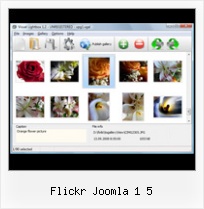
The following image set is generated by Flickr Gallery tool. Click any picture to run Lightbox gallery.

The example above is an in-page usage demo of Lightbox gallery that uses images from Flickr. The lightbox gallery created with Flickr Gallery tool is placed inside the page layout. You can also check the full-page demo web gallery. This example takes whole browser area to show the web gallery.Wordpress Flickr Gallery

How to Use

Step 1. Adding flickr images to your own gallery.


Locate the photo, photoset or photostream you want to use in your Flickr slideshow. Click on it to see the photo on its own page.

Copy URL of the flickr page.

Select Add images from Flickr... from the 'Add' button on the Toolbar.

Add images from Flickr

In the appeared window paste URL of the flickr page. Specify also the number of photos you want to add from the flickr page. Flickr Gallery will now include these photos in your project.

Add images from Flickr

If you have included the photos that you do not wish to be in your web gallery, you can easily remove them. Select all images that you wish to remove from photo gallery, and select Delete images. from the Images menu. You can pick and choose pictures by holding the CTRL while clicking the pictures you like.

Step 2. Adding caption.

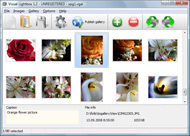
The name of the photo on flickr page will automatically appear in the caption. When you select a photo you'll see the various info about it, such as: Path, Size, date of last change and Caption. You can add any comment or text about the photo (up to 512 symbols).

Step 3. Gallery properties.

Change the name of your flickr album, the size and quality of your pictures with Flickr Gallery. From the Gallery menu, select Properties or use "Edit Gallery Properties" button on the toolbar.

On the first tab of the Gallery Properties window you can change the name of your photo album and enable/disable the following properties: Slide Show, Auto play Slide Show, Zoom effect, Overlay Shadow. You can also set the Overlay shadow color and select the Engine you want to use (jQuery or Prototype + script.aculo.us).

On the second tab of the Gallery Properties window you can select the thumbnail you want to use, set the Thumbnails Resolution, Thumbnails Quality, Thumbnails Titles. Select Thumbnails Format (save in PNG or JPG format). Specify the Number of columns in you photo album and the Page color.

On the third tab of the Gallery Properties window you can select the template, Image resolution and Image quality of your pictures and change the Watermark.

You can set up the various sizes for exported images.

Control the quality of output PNG or JPEG format image by defining output "Image quality" and "Thumbnail quality" parameters (0%…100%).

Step 4. Save your photo gallery as project file.

When you exit Flickr Gallery application, you'll be asked if you want to save your project. The project consists of the pictures you choose to put on your web photo gallery and all your settings. It's a good idea to save the project, because that will allow you to change the project in case you decide to do something different with future galleries. So click Yes, then enter a name for your project. To select the location of your project, just click the Browse folders button and choose a different location. Then click Save.

Photos From Flickr To Photobucket Flickr Joomla 1 5

Download Flickr Gallery


Download Flickr Gallery Download Free Edition
for Windows
Download Flickr Gallery Download Free Edition
for MAC

Flickr Gallery is free for non-commercial use.

A small fee is required for business use. Flickr Gallery Business Edition additionally provides an option to remove the Flickr Gallery. Com credit bar as well as a feature to put your own logo to images. After you conclude the payment via the secure order form, you will receive a license key instantly by e-mail that turns the Flickr Gallery Free Edition into a Business one. You can select the most appropriate payment mode: bank transfer, check, credit card, PayPal etc. Also you can get Business Edition for free if you help with translating Flickr Gallery into your native language, please contact us at for more info.

Flickr Lightbox Gallery Jquery

Buy Flickr GalleryBuy Business Edition
for Windows

$49
Single Website
$69
Unlimited Websites
Buy Flickr GalleryBuy Business Edition
for MAC

$49
Single Website
$69
Unlimited Websites

Support

For feature requests, troubleshooting, general help contact Customer Support at . Make sure to include details on your Flickr Gallery version, operating system, browser and a link (or relevant code).Flickr App View On Black

Feedback

    * I have installed Flickr Gallery to trial. All good, loving it!! I want to get an business version of your great programm. I love it - soo easy to use!!

    * I find Flickr Gallery (and lightbox2) a great tool and was about to proceed in its purchase.

    * Just a quick thank you for the software though, It's not often you get a free software version of this quality and style! Well done and please continue this amazing gallery. Hope to see more advances.How To Get Hack Flickr

    * I just tried the application, It is wonderful idea. Like you said in the website "few clicks without writing a single line of code" because most of the people is not web designers".

FAQ

Q:How do I embed the lightbox image gallery into an existing page?

A:To install Flickr Gallery gallery on your page you should:

1. Create your gallery in Flickr Gallery and publish it on a local drive in any test folder.
2. Open index.html file from the saved folder in any text editor.
3. Copy code for the HEAD section and paste it inside the HEAD section of you own webpage, for example:

<head>
...
<!-- Start Flickr Gallery.com HEAD section -->
<link rel="stylesheet" href="engine/css/vlightbox.css" type="text/css" />
<style>#vlightbox a#vlb{display:none}</style>
<link rel="stylesheet" href="engine/css/Flickr Gallery.css" type="text/css" media="screen" />
<script src="engine/js/jquery.js" type="text/javascript"></script>
<script src="engine/js/jquery.tools.min.js" type="text/javascript"></script>
<script src="engine/js/visuallightbox.js" type="text/javascript"></script>
<!-- End Flickr Gallery.com HEAD section -->

...
</head>


4. Copy code for the BODY section and paste it inside the Body section of you own webpage in the place where you want to have a gallery, for example:

<body>
...
<!-- Start Flickr Gallery.com BODY section -->
<div id="vlightbox">
<a rel="lightbox_vlb" href="data/images/dscn6831.jpg" title="DSCN6831"><img src="data/thumbnails/dscn6831.png"><span></span></a>
<a rel="lightbox_vlb" href="data/images/dscn6823.jpg" title="DSCN6823"><img src="data/thumbnails/dscn6823.png"><span></span></a>
<a rel="lightbox_vlb" href="data/images/dscn6819.jpg" title="DSCN6819"><img src="data/thumbnails/dscn6819.png"><span></span></a>
<a id="vlb" href="http://Flickr Gallery.com">Photo Gallery For Web by Flickr Gallery.com v2.1</a>
</div>
<!-- End Flickr Gallery.com BODY section -->

...
</body>


5. Copy 'data' folder with images and thumbnails and 'engine' folder with .css and .js files into the same folder with your own webpage.
You can find the example on our website:
http://www.Flickr Gallery.com/#example


RELATED

ARI Pretty Photo is nice Joomla! popup plugin and module ARI Pretty Photo is Joomla! component, extension for showing Flickr photos, YouTube videos, image galleries, remote page

HyBing - HyBing Hybing, joomla country block, joomla Ajax stock, Joomla Country Block, joomla easy paypal, Joomla EZ Paypal Country Procing, Country Pricing, Joomla EZ Paypal Gift Certificate, Paypal Gift Certificate, easypaypal, Quick IPN, report genie,

Flickr Photos Realizzato dall'esperto in Ozio AlexRed il componente Ozio Gallery permette di visualizzare immagini all'interno di interessanti applicazioni flash

random.geek() " Flickr Module for Joomla & Mambo Flickr Gallery for Joomla / Mambo HowTo Instructions #1: AXMX Method Gallery for Joomla / Mambo HowTo Instructions #2: by Ben Coleman

Photo Channels - Joomla! Extensions Directory Find extensions for your Joomla site in the Joomla Extensions Directory, the official directory for Joomla components, modules and plugins. 5 votes1 reviews. This module shows images from your Picasa, Flickr, PhotoBucket and virtually any media feed supported site accounts to directly in

Joomla Templates, Training, and Extensions, Wordpress Themes Joomla templates by Joomlashack, a provider of custom, free and commercial Joomla Templates

The Joomla Blog The mission of this blog is to make using joomla simple. 5 (1 vote, average: 4.00 out of 5) Adding Tweetmeme to your Joomla site. Posted by: Qasim Virjee on Wednesday, 30 December 2009 in: site promotion & SEO. There are so many reasons to making your site easily visible on Social Networking websites

Amazon.com: Joomla! 1.5 Multimedia (9781847197702): Allan Amazon.com: Joomla! 1.5 Multimedia (9781847197702): Allan Walker: Books 4.2 out of 5 stars See all reviews (4 customer reviews) 4 Reviews. 5 star: (2) 4 star: (1) 3 star: (1) 2 star: (0) 1 star: (0) " See all 4 customer reviews List Price:

Paul Thompson's Joomla Code {flickr-album}Type=Search, Tags=joomla, Cols=5, Rows=3{/flickr-album} {flickr-album}Type=User, User=35939596@N00{/flickr-album} {flickr-album}Type=User, User=35939596@N00, Tags=geyser{/flickr-album} {flickr-album}Title=Everyone Love's Kittens, Type=Group, Group=365105@N23{/flickr-album}

Installing the plugin The Flickr Slideshow plug-in for Joomla 1.5 is a free open source plug-in to display contrast to other Joomla Flickr plugins, this plugin doesn't require editing the website

New "Joomla! Picasa" and "Joomla! Flickr" " Roberto Aloi The Joomla Flickr component should represent a front-end for pictures hosted in Flickr. 5:10 pm | Reply. I have tried your newest joomla! flickr and if i press the Joomla Flickr

Best of Joomla - Flickr Badge Plugin for Joomla 1.5 Native FireBoard, FireMessage home. Commercial and Free Joomla templates, Joomla 1.5 Templates, Joomla Extensions, Joomla Resources, Tutorials and news

Art Pretty Photo - Joomla! extension to display images Art Pretty Photo - Joomla! extension to display images/galleries/videos/external/Flickr/Picasa pages in pretty highly customizable popup window

SB Menu Module For Joomla 1.5 | Joomla Tutorial SB Menu is a simple, easy-to-use and flexible module for the famous content management system Joomla! It is powered by Joomla!'s default menu navigation system

roberto.aloi / joomla-flickr / overview — bitbucket.org Mercurial hosting - we're here to serve. Followers (1) RSS. Atom. pull request. fork. patch queue. follow. get source " zip. gz. bz2. branches " default. tags " tip. zip. gz. bz2. roberto.aloi / joomla-flickr (http://aloiroberto.wordpress.com/) This Joomla! 1.5 component allows you to create an eye

Chris McDermott BLOG " Blog Archive " Tutorial: Flickr This is tutorial has been created from instructions from other Joomla users and is not entirely my work. But I get the message "The Flickr API returned error code #1: Photoset not found" when I click on the Sets (all sets) thumbnail

Joomla! 1.5 Multimedia " Free Ebooks Video training magazines Joomla! 1.5 Multimedia Packt Publishing | 2010-02-17 | ISBN: 1847197701 | Index & review ebookw.net | 376 pages | PDF | 19 MBBuild media-rich Joomla! web sites by learning to embed an

Embed Flickr Plugin | The atareao En fin, empiezo de nuevo. Bueno, bueno, bueno, no podía hacerse esperar, tanto tiempo con el plugin de Picasa, que finalmente tenía que hacer uno para Flickr

Issue 8 - google-highly-open-participation-joomla - Create a Create a Joomla! v 1.5 plugin for Flickr Images. 5 people starred this issue and may be One line summary Create a Joomla! v 1.5 plugin for Flickr Images. Description Using the plugins/content/loadmodule.php and loadmodule.xml files as an example, create a plugin that will load a Flickr image when

Downloads | Joomla! 1.5 Plugins labanex.com is a site of everything that I am. 5 Content Mambots. There are no documents in this category. Most Visited Joomla! Pages. Twitter @link Plugin for Joomla! 1.5. Viddler Video Plugin for Joomla! 1.5. Flickr Video Plugin for Joomla!

Flickr: "Joomla!dayDE2006" Flickr is almost certainly the best online photo management and sharing application in the world. Show off your favorite photos and videos to the world, securely and privately show content to your friends and family, or blog the photos and videos

Walter Cedric Wiki Jump to: navigation, search. Contents. 1 Root hosting. 1.1 Strato. 2 Java stuff. 2.1 Tux Droid. 3 RC Helicopter 4 Joomla! 5 Joomla 1.5.X. 5.1 Smugmug Gallery. 5.2 Smugmug, Flickr and Picasa. 5.3 photofeed

Joomla Flickr module in Wordpress style tutorial | Psdeluxe We create tutorial to show how easy you can create nice Flickr module for Joomla websites. I will show you how to create W3C valid Flickr code that you can add in to your Joomla website. We will get Joomla Flickr module that will show images from

Joomla Open source, content management system Joomla! is a publisher that features caching, RSS feeds, news flashes and many other features. It allows a person to easily upload content to a web server without knowing any languages such as HTML or PHP

Joomla Mambots Joomla Mambots download - SORT BY: Date Submitted, Title, Score, Rating, Votes, Downloads, Author; ORDER BY: Descending, Ascending; ITEMS/PAGE; VIEW OPTIONS: Full Details, Less Details

